
The Complete Guide to AI APIs for Beginners in 2026
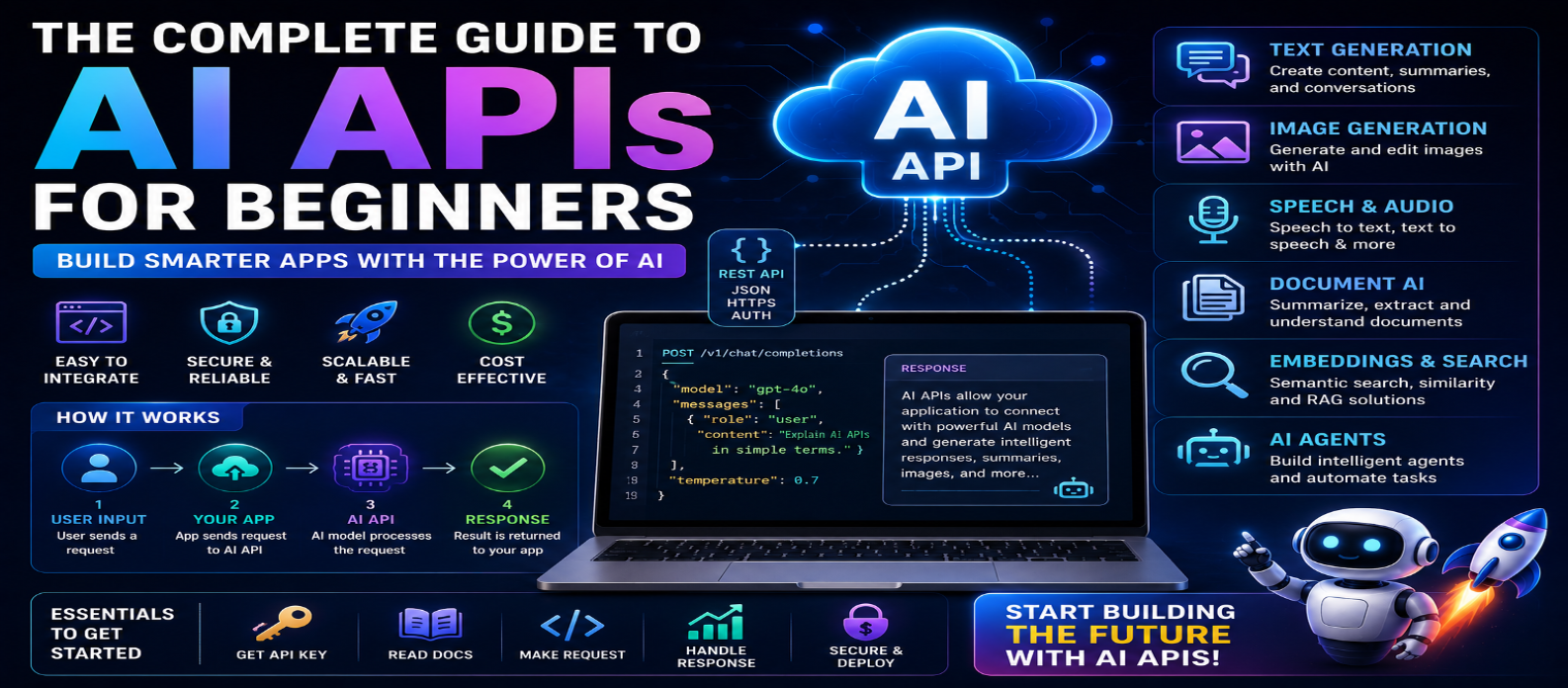
"Learn how AI APIs work with this complete beginner's guide for 2026. Understand API keys, endpoints, JSON, tokens, context windows, embeddings, RAG, security, costs, and how to integrate artificial intelligence into websites and applications."
The Complete Guide to AI APIs for Beginners in 2026
Artificial intelligence is no longer limited to standalone chatbots and specialized applications. In 2026, developers and businesses can integrate AI directly into websites, mobile apps, software products, online tools, and automated workflows using AI APIs.
An AI API allows your application to communicate with an artificial intelligence model without requiring you to build and train the model yourself. With a few API requests, developers can add capabilities such as text generation, chatbots, image analysis, content summarization, translation, speech processing, document analysis, and intelligent automation.
If terms such as API endpoints, API keys, JSON, tokens, requests, and responses sound complicated, don't worry. This beginner-friendly guide explains what AI APIs are, how they work, how to use them, and how to integrate them securely into applications.
What Is an AI API?
An AI API (Artificial Intelligence Application Programming Interface) is a way for one application to communicate with an AI service.
Instead of developing your own AI model, your application sends information to an AI provider and receives a generated or analyzed result.
A simplified workflow looks like:
User → Your Application → AI API → AI Model → API Response → User
For example, imagine you've created an AI summarization website.
A user enters a long article. Your website sends the text through an AI API, the model creates a summary, and your website displays the result.
What Can AI APIs Do?
Modern AI APIs can power many types of applications.
Depending on the service and model, they may support:
- Text generation
- Conversational AI
- Summarization
- Translation
- Classification
- Information extraction
- Image generation
- Image understanding
- Speech recognition
- Text-to-speech
- Coding assistance
- Document analysis
- Embeddings
- AI agents
This means a single website or application can potentially combine several AI capabilities.
Why Use an AI API?
Training a powerful AI model from scratch can require enormous amounts of data, computing infrastructure, expertise, time, and money.
AI APIs provide a simpler alternative.
Developers can focus on building the application while an AI provider manages much of the underlying model infrastructure.
Common advantages include:
Faster Development → Lower Initial Complexity → Scalable Access → Advanced AI Capabilities → Easier Experimentation
However, APIs can introduce usage costs, external dependencies, privacy considerations, and service limits.
Understanding APIs in Simple Terms
Imagine a restaurant.
You are the customer, the kitchen is the AI model, and the waiter is the API.
You give your request to the waiter:
"I'd like a vegetable pizza."
The waiter sends your request to the kitchen.
The kitchen prepares the result, and the waiter brings it back.
In software:
Application sends request → API delivers request → AI processes it → API returns response
Your application doesn't need to know every detail about how the AI model works internally.
What Is an API Endpoint?
An endpoint is a specific API location designed for a particular type of request.
Depending on an AI service, different endpoints might handle tasks such as:
Text Generation → Images → Audio → Embeddings
Your application sends an HTTP request to the appropriate endpoint.
The exact endpoint structure depends on the AI provider you're using.
What Is an API Key?
An API key is a private credential used to identify and authenticate your application with an API service.
Think of it like a password for your application's API access.
An important rule is:
Never expose private API keys publicly.
Do not place secret API keys directly inside publicly accessible frontend JavaScript or public code repositories.
Instead, store them securely on your server using environment variables or an appropriate secrets-management system.
How Does an AI API Request Work?
A typical AI API interaction contains several steps:
1. User provides input
↓
2. Frontend sends input to your backend
↓
3. Backend validates the request
↓
4. Backend sends request to the AI API
↓
5. AI model processes the request
↓
6. API returns the response
↓
7. Backend validates/processes the result
↓
8. Website displays the result
This architecture gives you greater control over authentication, security, costs, and user permissions.
Understanding JSON
Many APIs exchange information using JSON, which stands for JavaScript Object Notation.
A simplified request might conceptually contain:
{
  "input": "Explain artificial intelligence to a beginner."
}
A simplified response might look like:
{
  "result": "Artificial intelligence is technology that enables computers..."
}
Actual request and response structures vary between APIs.
Understanding basic JSON is extremely useful when working with AI APIs.
What Are Tokens?
Many language-model APIs process text using units called tokens.
A token may represent a complete word, part of a word, punctuation, or another piece of text.
Token usage can affect:
- Input limits
- Output limits
- Context size
- Processing costs
Long prompts and large generated responses generally require more processing than short ones.
When building a public AI application, monitoring usage is essential.
What Is a Context Window?
The context window represents how much information an AI model can consider within a request or interaction, depending on the model and API design.
This might include:
Instructions + Conversation + Documents + User Input + Retrieved Information
If you're processing very large documents, you may need techniques such as chunking, retrieval, or summarization rather than sending unlimited text at once.
What Are Embeddings?
Embeddings are numerical representations of information that can help software measure semantic similarity.
They are commonly used for:
- Semantic search
- Recommendation systems
- Document retrieval
- Similarity matching
- RAG applications
For example, embeddings can help find documents related to:
"How do I get my money back?"
even when the document itself uses the phrase:
"Refund and return policy."
This allows search systems to focus more on meaning rather than exact keyword matching.
What Is RAG?
Retrieval-Augmented Generation (RAG) combines information retrieval with generative AI.
A simplified RAG workflow is:
User Question → Search Knowledge Base → Retrieve Relevant Content → Send Context to AI → Generate Answer
RAG can help create AI applications that answer questions using:
- Company documents
- Product information
- Help centers
- Website content
- Manuals
- Internal knowledge bases
It is one of the most useful patterns for building specialized AI assistants.
What Are AI API Parameters?
AI APIs often allow developers to configure how requests are processed.
Depending on the API, settings may control things such as:
- Model selection
- Output length
- Response format
- Generation behavior
- Tools
- Structured output
You shouldn't change parameters randomly.
Understand what each setting does and test how it affects your application's results.
How to Build Your First AI API Application
A beginner-friendly project could be an AI text summarizer.
The workflow would be:
Step 1: Create a webpage with a text box.
Step 2: Let the user paste text.
Step 3: Send the text to your backend.
Step 4: Validate the input.
Step 5: Send an API request to an AI model.
Step 6: Receive the generated summary.
Step 7: Display it on the webpage.
Once this works, you can gradually add authentication, saved history, different summary styles, file uploads, and other features.
AI API Security Best Practices
Security becomes especially important when your application is publicly accessible.
Use:
- Server-side API calls
- Secure secret storage
- Authentication
- Input validation
- Rate limiting
- Usage quotas
- Error handling
- Request logging where appropriate
- Permission controls
Never trust user input automatically.
If an AI system can perform actions, use additional safeguards and human confirmation for sensitive operations.
How to Control AI API Costs
AI APIs may charge based on model usage, tokens, generated media, or other measurements.
To control costs:
Limit Input → Limit Output → Set User Quotas → Monitor Usage → Cache Suitable Results → Choose Appropriate Models
Don't wait until your application becomes popular before implementing usage controls.
A public API endpoint without restrictions can create unexpected costs.
Handle API Errors Properly
AI APIs can occasionally fail because of:
- Network problems
- Rate limits
- Invalid requests
- Service interruptions
- Authentication errors
- Input limits
Instead of displaying a technical error to users, your application should provide a useful message such as:
"We couldn't process your request right now. Please try again."
Good error handling is an important part of professional AI application development.
Common Beginner Mistakes
Avoid these mistakes:
- Exposing API keys
- Trusting every AI response
- Ignoring API costs
- Sending unlimited user input
- Skipping rate limits
- Ignoring privacy
- Using AI without error handling
- Deploying generated code without testing
- Giving AI unnecessary permissions
An AI API may be easy to connect, but building a reliable AI application still requires good software engineering.
AI API Learning Roadmap
If you're a beginner, learn in this order:
HTML/CSS → JavaScript → HTTP → JSON → REST APIs → Backend Development → AI APIs → Security → Embeddings → RAG → AI Agents
You don't need to master everything before experimenting.
Start with a simple API request and gradually build more advanced projects.
Conclusion
AI APIs make powerful artificial intelligence capabilities accessible to developers without requiring them to train sophisticated AI models from scratch.
They can power chatbots, content generators, smart search, document analysis, image tools, speech applications, recommendation systems, RAG assistants, and AI agents.
The basic concept is simple:
Your Application → Secure Backend → AI API → AI Model → Response → User
For beginners, the most important concepts to understand are API requests, endpoints, API keys, JSON, tokens, context windows, embeddings, security, and usage costs.
Start with one simple AI feature, protect your credentials, control usage, test your outputs, and expand gradually.
Once you understand how AI APIs work, you have the foundation to turn AI from something you simply use into technology you can actually build into your own websites and applications.
Get a Free Access To 200+ Free Tools:
|
Home Page |
|
|
Calculator Tools |
|
|
Text & Converter Tools |
|
|
PDF & Image Tools |
|
|
Games & Developer Tools |
|
|
Resume Builder |