
AI Chatbots Explained: How They Work and How to Build One in 2026
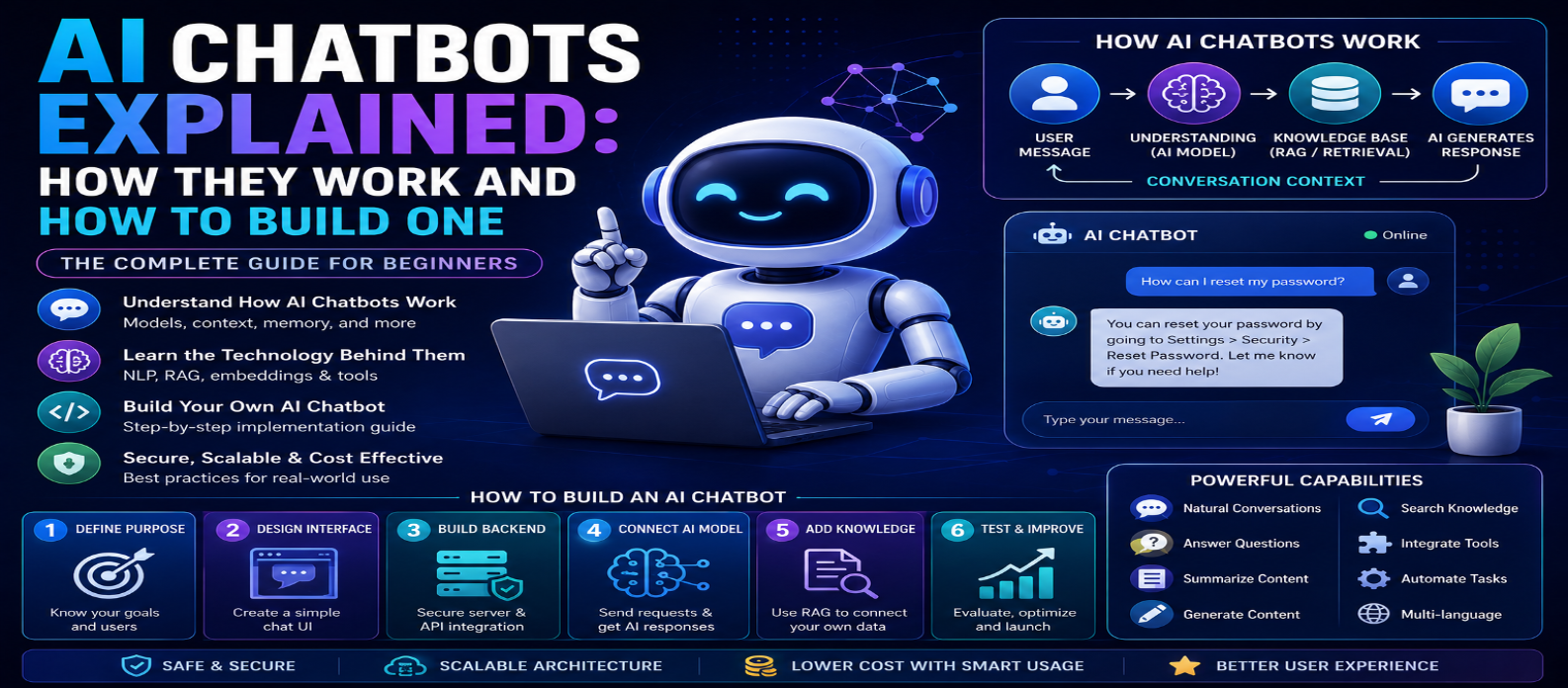
"Learn how AI chatbots work and how to build one in 2026. This beginner-friendly guide covers AI models, conversation context, RAG, embeddings, knowledge bases, APIs, chatbot architecture, security, costs, tools, and step-by-step development."
AI Chatbots Explained: How They Work and How to Build One in 2026
AI chatbots have evolved far beyond simple question-and-answer programs. In 2026, modern chatbots can understand natural language, maintain conversational context, search knowledge bases, analyze documents, generate personalized responses, and connect with external tools and business systems.
Businesses use AI chatbots for customer support, websites use them to help visitors find information, and developers integrate conversational AI into applications, productivity tools, educational platforms, and online services.
But how does an AI chatbot actually work? And how can you build one yourself?
This complete guide explains what AI chatbots are, how they work, the technology behind them, and how to build an AI chatbot step by step.
What Is an AI Chatbot?
An AI chatbot is software that uses artificial intelligence to understand user messages and generate conversational responses.
A user might ask:
"Which of your plans is best for a small business?"
Instead of searching for an exact predefined phrase, a modern AI chatbot can interpret the meaning of the question and generate a relevant response based on its instructions and available information.
AI chatbots can be integrated into:
- Websites
- Mobile applications
- Customer-support systems
- E-commerce stores
- SaaS products
- Educational platforms
- Internal business tools
They can range from simple assistants to sophisticated systems capable of using tools and completing approved actions.
Traditional Chatbots vs AI Chatbots
Traditional chatbots usually depend heavily on predefined rules.
A basic workflow might be:
User selects option → Rule matches → Prewritten response
AI chatbots work differently:
User Message → AI Understands Context → Relevant Information Retrieved → Response Generated
This allows users to communicate naturally rather than choosing only from predefined buttons or commands.
| Feature | Traditional Chatbot | AI Chatbot |
|---|---|---|
| Conversation | Rule-based | Natural-language based |
| Responses | Mostly predefined | Dynamically generated |
| Flexibility | Limited | High |
| Context | Usually limited | Can maintain conversation context |
| Knowledge | Fixed rules/data | Model + connected knowledge |
| Complex questions | Difficult | Better suited |
| Setup | Often simpler | More advanced |
Both approaches can still be useful depending on the application.
How Does an AI Chatbot Work?
A simplified AI chatbot architecture looks like:
User → Chat Interface → Backend → AI Model → Response → User
A more advanced system might use:
User → Backend → Instructions → Conversation Context → Knowledge Retrieval → AI Model → Validation → Response
Let's break this down.
1. The User Sends a Message
The conversation begins when the user enters a message such as:
"How can I reset my password?"
The frontend sends that message to your backend server.
The backend is important because it can manage security, authentication, AI credentials, rate limits, conversation history, and business logic.
2. The Chatbot Processes the Instructions
AI chatbots can receive instructions defining how they should behave.
For example:
"You are a customer-support assistant. Answer questions using the company's approved knowledge base. Keep answers concise and never invent product policies."
These instructions help define the chatbot's:
- Purpose
- Tone
- Rules
- Limitations
- Response style
Clear instructions generally make chatbot behavior more consistent.
3. Conversation Context Is Added
A useful chatbot needs to understand previous messages.
Consider this conversation:
User: "Tell me about the premium plan."
Chatbot: "The premium plan includes..."
User: "How much does it cost?"
The chatbot needs to understand that "it" refers to the premium plan.
Relevant conversation history can therefore be included in the context sent to the model.
However, continuously sending an unlimited conversation history can increase processing requirements and costs, so applications should manage context carefully.
4. The AI Model Generates a Response
The chatbot sends the necessary instructions, context, and user message to an AI model.
The model processes the information and generates an appropriate response.
A simplified workflow is:
Instructions + Context + User Message → AI Model → Generated Response
The response then returns to your backend before being displayed to the user.
5. Connecting a Chatbot to Your Own Data
A general AI model may not know your latest business information.
For example, it may not know:
- Your current prices
- Internal policies
- Product inventory
- Support documentation
- Private company information
One solution is Retrieval-Augmented Generation (RAG).
What Is RAG for Chatbots?
RAG allows your chatbot to retrieve relevant information before generating its answer.
The process looks like:
User Question → Search Knowledge Base → Retrieve Relevant Information → Send Context to AI → Generate Answer
Your knowledge base could contain:
- FAQs
- Website pages
- Product documentation
- Help articles
- Manuals
- Internal documents
This helps the chatbot answer questions based on your approved information rather than relying only on the AI model's general knowledge.
What Are Embeddings?
Embeddings convert information into numerical representations that can help software find content with similar meaning.
Suppose a user asks:
"Can I get my money back?"
Your documentation might contain a section called:
Refund and Return Policy
Semantic retrieval can recognize that these concepts are related even though the wording is different.
Embeddings are therefore commonly used in AI chatbot search and RAG systems.
Can AI Chatbots Perform Actions?
Yes. More advanced chatbots can connect to tools or APIs.
For example, an approved chatbot might:
- Check order status
- Search inventory
- Schedule appointments
- Create support tickets
- Retrieve account information
- Update permitted records
The workflow becomes:
User Request → AI Determines Required Tool → Application Executes Approved Action → Result Returned → AI Explains Result
Sensitive actions should require strong authentication, authorization, validation, and sometimes explicit user confirmation.
How to Build an AI Chatbot
You don't need to train a large AI model yourself.
A basic chatbot can be built using an existing AI API.
Step 1: Define the Chatbot's Purpose
Decide exactly what it should do.
Examples:
Customer Support | Website Assistant | AI Tutor | Shopping Assistant | Internal Knowledge Assistant
Avoid building a chatbot that tries to handle everything.
Step 2: Create the Chat Interface
Your frontend needs a simple interface containing:
Message Input → Send Button → Conversation Area
Make it responsive and accessible on both desktop and mobile devices.
Step 3: Build a Secure Backend
Your backend receives user messages and communicates with the AI service.
A recommended architecture is:
Browser → Your Backend → AI API
Never expose private AI API credentials directly in frontend JavaScript.
Step 4: Connect an AI Model
Your backend sends the user's request to the selected AI model and receives a response.
You can provide instructions controlling:
- Chatbot role
- Tone
- Response length
- Allowed topics
- Output format
Test different instructions until the behavior is appropriate for your application.
Step 5: Add Conversation Memory
Store or manage relevant conversation context so users can have natural follow-up conversations.
Don't automatically retain unnecessary sensitive information.
Design your memory system around privacy, usefulness, and data-retention requirements.
Step 6: Add Your Knowledge Base
If your chatbot needs specialized information, add RAG.
A typical architecture becomes:
Question → Embedding/Search → Relevant Documents → AI Model → Answer
Keep the underlying knowledge base accurate and updated.
Step 7: Add Security Controls
Public chatbots need protection against abuse.
Implement:
- Authentication where needed
- Rate limiting
- Input limits
- Output limits
- Secure API-key storage
- Permission controls
- File validation
- Error handling
If tools can perform actions, give them only the minimum permissions required.
Step 8: Control Costs
AI chatbot costs can increase as usage grows.
Monitor:
Number of Requests → Input Size → Output Size → Model Usage → Retrieval Costs
Use quotas, caching where appropriate, input limits, and efficient context management.
Step 9: Design for Incorrect Answers
AI chatbots can make mistakes.
Consider allowing the chatbot to:
- Say when it doesn't know
- Provide relevant sources when appropriate
- Escalate to human support
- Ask clarifying questions
- Avoid unsupported claims
Don't design the interface to imply that every generated answer is guaranteed to be correct.
Step 10: Test and Launch
Before launch, test:
Normal Questions → Difficult Questions → Unexpected Inputs → Long Conversations → Errors → Mobile → Security → High Usage
Continue monitoring the chatbot after deployment.
Real users will ask questions you didn't anticipate.
AI Chatbot Architecture Example
A more complete architecture might look like:
User
↓
Chat Interface
↓
Secure Backend
↓
Authentication + Rate Limiting
↓
Conversation Context
↓
Knowledge Retrieval / RAG
↓
AI Model
↓
Tool Calls When Required
↓
Response Validation
↓
User
This architecture can scale from a simple website chatbot into a sophisticated AI assistant.
Common AI Chatbot Mistakes
Avoid:
- Exposing API keys
- Allowing unlimited requests
- Trusting every generated answer
- Giving AI excessive permissions
- Ignoring privacy
- Sending unnecessary sensitive data
- Using outdated knowledge
- Skipping human escalation
- Launching without testing
A successful chatbot requires more than simply connecting an AI model to a text box.
The Future of AI Chatbots
AI chatbots are evolving into broader AI assistants and agents.
Instead of only answering:
"Where is my order?"
future-oriented systems can potentially understand the request, securely check the appropriate system, explain the status, and take approved follow-up actions.
The shift is:
Chatbot That Answers → Assistant That Understands → Agent That Takes Approved Actions
Human oversight, security, and permissions become increasingly important as capabilities grow.
Conclusion
AI chatbots combine natural-language processing, AI models, conversation context, knowledge retrieval, APIs, and automation to create more flexible conversational experiences.
The basic architecture is straightforward:
User → Backend → AI → Response
More powerful chatbots add:
Context + RAG + Tools + Security + Human Oversight
Start with a clearly defined use case, build a simple chat interface, keep AI credentials on a secure backend, add your own knowledge when necessary, control costs, and thoroughly test the system.
Once you understand these fundamentals, you can move from simply using AI chatbots to building intelligent conversational experiences for your own websites and applications.
Get a Free Access To 200+ Free Tools:
|
Home Page |
|
|
Calculator Tools |
|
|
Text & Converter Tools |
|
|
PDF & Image Tools |
|
|
Games & Developer Tools |
|
|
Resume Builder |