
AI Website Development: From Idea to Working Website
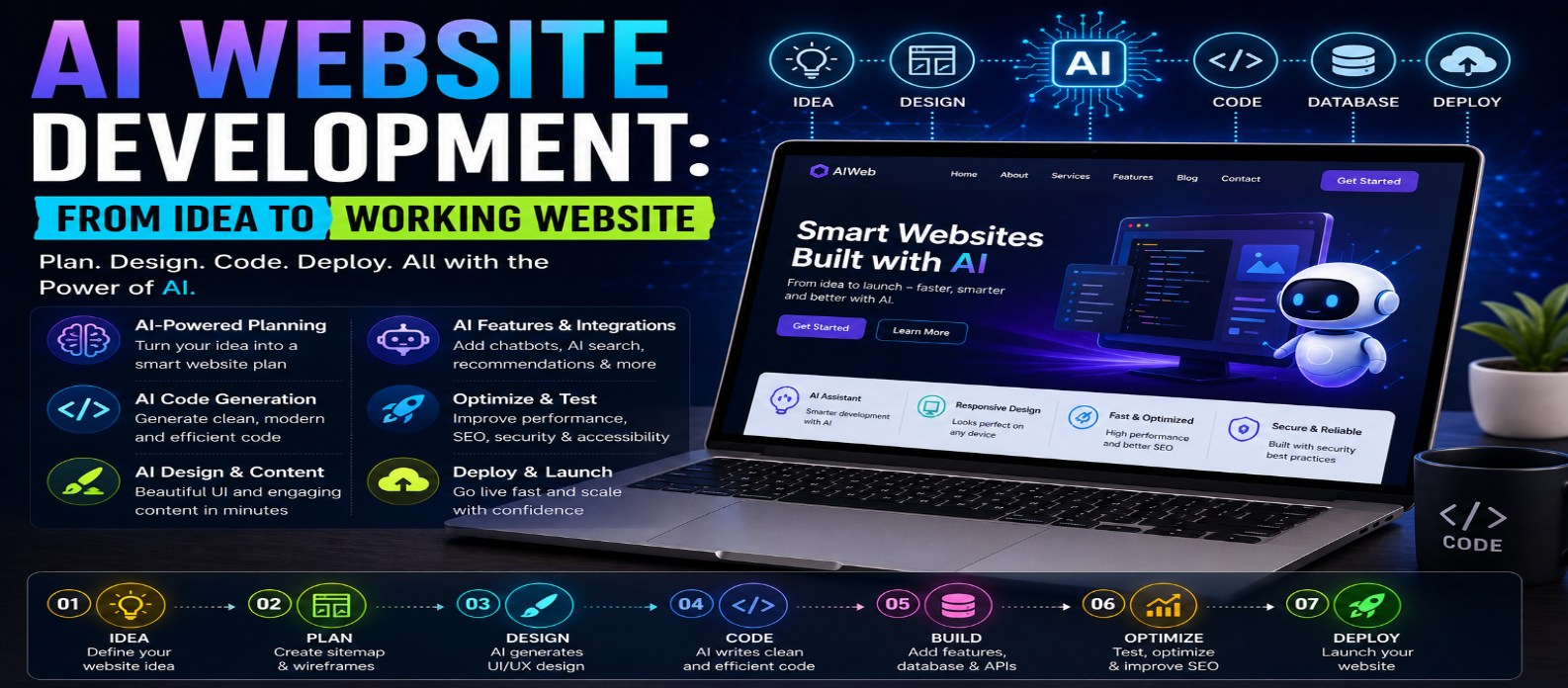
"Learn AI website development step by step, from turning an idea into a website plan to AI-assisted design, coding, backend development, SEO, security, testing, optimization, and deployment."
AI Website Development: From Idea to Working Website
Artificial intelligence is transforming the way websites are planned, designed, coded, tested, and maintained. What once required hours of manual work can now be accelerated with AI website development tools that assist with everything from brainstorming and UI design to code generation and debugging.
However, creating a successful AI-built website involves more than entering a prompt and publishing the result. You still need a clear idea, suitable technology, quality content, strong security, good performance, and human review.
This guide explains how to take an idea and turn it into a working AI-powered website step by step.
What Is AI Website Development?
AI website development means using artificial intelligence to assist with some or all stages of building a website.
AI can help developers and website owners with:
- Website planning
- UI and layout ideas
- Code generation
- Content creation
- Debugging
- Testing
- SEO
- Accessibility
- Performance optimization
- Website maintenance
AI can also become part of the finished website through features such as chatbots, intelligent search, recommendations, and natural-language interfaces.
Step 1: Define Your Website Idea
Every successful website starts with a clear purpose.
Before using an AI tool, answer a few basic questions:
What will the website do? Who is it for? What problem will it solve? What features does it need?
For example, instead of asking AI to "build a business website," create a clearer requirement:
Build a responsive website for a digital marketing agency with a homepage, services, portfolio, pricing, blog, contact form, and mobile navigation.
Detailed requirements usually produce more useful results.
Step 2: Plan the Website Structure
Next, create the site's basic architecture.
A typical website might contain:
Home → About → Services → Blog → Contact
An e-commerce or web application project may require additional pages for products, accounts, dashboards, authentication, or checkout.
AI can help generate a sitemap, navigation structure, user journey, and feature list before development begins.
Step 3: Choose Your Technology
The technology stack depends on what you're building.
A simple website may only require:
- HTML
- CSS
- JavaScript
More advanced applications may use:
- React
- Next.js
- Vue
- Node.js
- Python
- PHP
- SQL or NoSQL databases
- Cloud services
Avoid choosing a complex technology stack simply because AI recommends it. Select technologies according to the project's actual requirements.
Step 4: Create the Website Design With AI
AI can help transform your description into a visual concept.
You can use AI to generate ideas for:
- Page layouts
- Hero sections
- Navigation
- Buttons
- Forms
- Dashboards
- Color schemes
- Typography
- Responsive layouts
Use AI-generated designs as a starting point, then refine them for your brand and users.
A professional website should remain consistent, readable, responsive, and accessible.
Step 5: Generate and Build the Code
AI coding assistants can generate HTML, CSS, JavaScript, components, backend functions, and other code from natural-language instructions.
Instead of requesting an entire complicated application at once, divide the project into smaller tasks:
Navigation → Hero → Features → Forms → API → Database → Authentication
This makes generated code easier to understand, test, and correct.
AI-generated code should always be reviewed before production. AI-assisted software engineering still requires human oversight to ensure generated code is appropriate and reliable.
Step 6: Add Backend Features and a Database
Interactive websites may require backend functionality.
This can include:
- User registration
- Login systems
- Contact forms
- Payment processing
- Database storage
- User dashboards
- API integrations
AI can help create backend code and database queries, but security-sensitive functionality requires especially careful review.
Never expose passwords, API keys, database credentials, or other secrets in frontend code.
Step 7: Add AI Features
If your website itself needs AI functionality, you can integrate an AI service through an API or use supported client-side AI technologies.
Possible features include:
- AI chatbot
- Intelligent search
- Content summarization
- Recommendations
- Document analysis
- Image understanding
- Natural-language interfaces
- Customer-support assistants
Web-focused AI is also expanding beyond server APIs. Google's web AI guidance covers both server-side and client-side AI approaches for web developers.
Step 8: Optimize for SEO
AI can help draft SEO elements, but search optimization still requires thoughtful implementation.
Optimize:
- Page titles
- Meta descriptions
- Heading structure
- URLs
- Internal links
- Image alt text
- Structured data
- XML sitemap
- Mobile usability
- Page speed
Content should primarily be created to provide genuine value to visitors rather than simply to generate search traffic.
Step 9: Optimize Performance
A visually impressive AI-generated website can still fail if it loads slowly.
Review:
- Image sizes
- JavaScript bundles
- CSS
- Fonts
- Third-party scripts
- Server response times
- Caching
- Core Web Vitals
Google's Core Web Vitals focus on loading performance, responsiveness, and visual stability through metrics including LCP, INP, and CLS.
Step 10: Test Security and Accessibility
Before publishing, test the website carefully.
Check:
- Forms
- Navigation
- Authentication
- API permissions
- Input validation
- HTTPS
- Mobile layouts
- Keyboard navigation
- Form labels
- Error handling
AI-generated applications can introduce security problems if code is deployed without proper review.
Accessibility should also be built into the development process rather than added as an afterthought.
Step 11: Test on Multiple Devices and Browsers
A website that works on your laptop may behave differently elsewhere.
Test on:
Desktop → Tablet → Mobile
Also verify compatibility across major browsers.
Modern browser support changes frequently, so developers can use resources such as Baseline to determine whether web-platform features are broadly supported.
Step 12: Deploy Your Website
Once testing is complete, deploy your project using an appropriate hosting or cloud platform.
A typical deployment process includes:
Domain → Hosting → DNS → HTTPS → Deployment → Monitoring
After launch, monitor errors, security, analytics, search performance, uptime, and website speed.
AI Website Development Workflow
The complete process can be summarized as:
Idea → Requirements → Sitemap → Technology → AI Design → Code → Backend → AI Features → SEO → Performance → Security → Testing → Deployment
AI can accelerate nearly every stage, but human decisions remain important throughout the process.
Conclusion
AI website development makes it possible to move from an idea to a working website faster than traditional workflows alone. AI can assist with planning, design, coding, debugging, content, testing, SEO, and even intelligent features within the finished website.
The key is not to let AI make every decision automatically. Successful websites still require clear requirements, technical knowledge, security reviews, accessibility, performance optimization, testing, and ongoing maintenance.
The most effective approach is simple: use AI to accelerate development while keeping humans responsible for quality, security, and the final user experience.
Get a Free Access To 200+ Free Tools:
|
Home Page |
|
|
Calculator Tools |
|
|
Text & Converter Tools |
|
|
PDF & Image Tools |
|
|
Games & Developer Tools |
|
|
Resume Builder |