
Best AI Tools for Students, Professionals and Businesses in 2026
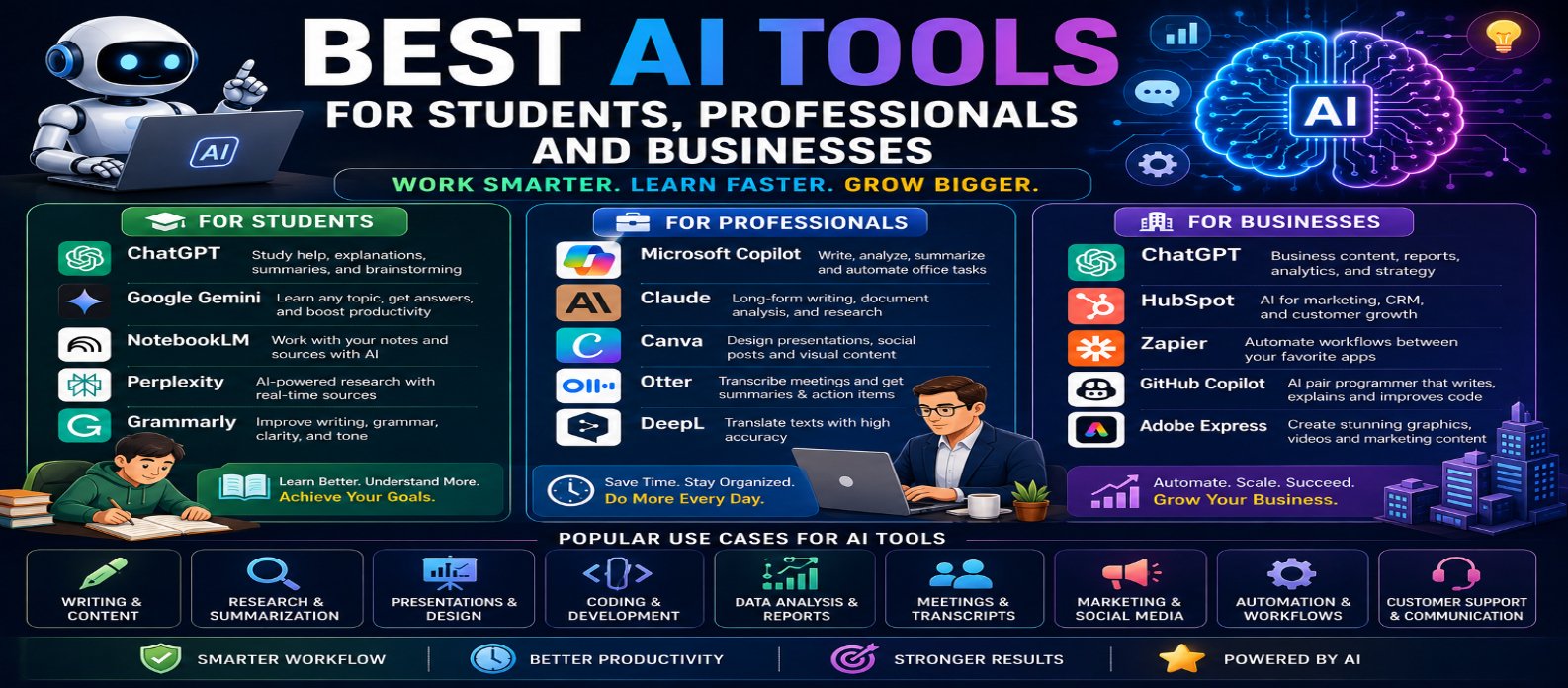
"Discover the best AI tools for students, professionals, and businesses in 2026. Explore AI tools for learning, research, writing, productivity, meetings, design, coding, marketing, CRM, automation, and everyday work."
Best AI Tools for Students, Professionals and Businesses in 2026
Artificial intelligence has become an important productivity technology for learning, writing, research, coding, design, data analysis, meetings, marketing, customer support, and business automation.
In 2026, the challenge isn't finding AI tools—it's choosing the right ones. Hundreds of AI products promise to save time, but different users have very different requirements. A student may need research and study assistance, while a professional may prioritize documents and meetings. Businesses may need automation, marketing, analytics, and customer support.
This guide explores some of the best AI tools for students, professionals, and businesses in 2026, along with practical ways to choose the right AI toolkit.
Note: Features, free plans, pricing, usage limits, and availability can change. Check the latest plan before choosing a tool for long-term use.
Why Are AI Tools So Useful in 2026?
Modern AI tools can understand and generate multiple types of information, including:
Text → Documents → Images → Code → Audio → Video → Data
Depending on the tool, AI can help users:
- Research information
- Summarize documents
- Write and edit content
- Analyze data
- Generate images
- Create presentations
- Write code
- Transcribe meetings
- Automate repetitive tasks
- Brainstorm ideas
The best results come from using AI to support human judgment rather than blindly replacing it.
Best AI Tools for Students
Students can use AI to understand difficult subjects, organize research, create study materials, improve writing, and learn more efficiently.
1. ChatGPT – Best All-Purpose AI Assistant
ChatGPT can help students with:
- Explaining concepts
- Creating study plans
- Summarizing information
- Brainstorming
- Writing assistance
- Coding
- Practice questions
- Research assistance
Students can ask for explanations at different difficulty levels.
For example:
"Explain photosynthesis as if I'm a beginner, then give me 10 questions to test my understanding."
AI should be used to learn and understand, not simply to complete academic work without comprehension.
2. Google Gemini – Best for Everyday Learning Assistance
Gemini is useful for a broad range of learning and productivity tasks.
Students can use it for:
- Topic explanations
- Brainstorming
- Writing assistance
- Summaries
- Study planning
- Coding assistance
- Research support
It can be especially convenient for users already working with Google's ecosystem.
3. NotebookLM – Best for Studying Your Own Sources
NotebookLM is particularly useful when students want AI assistance grounded in material they provide.
It can help with:
- Lecture notes
- Research papers
- Study documents
- Reports
- Source summaries
- Question answering
- Study guides
Instead of asking general questions, students can work directly with their selected source materials.
4. Perplexity – Best for AI-Assisted Research
Perplexity can help students discover and explore information using an AI-powered research experience.
It is useful for:
- Exploring topics
- Finding sources
- Asking follow-up questions
- Comparing information
- Starting research projects
Students should still inspect original sources before citing information in academic work.
5. Grammarly – Best for Improving Writing
Grammarly can help students improve:
- Grammar
- Spelling
- Clarity
- Sentence structure
- Tone
- Readability
It can be useful for essays, emails, reports, applications, and other writing assignments.
Best AI Tools for Professionals
Professionals often need AI for communication, documents, meetings, research, presentations, analysis, and everyday productivity.
6. Microsoft Copilot – Best for Workplace Productivity
Microsoft Copilot can assist with a variety of professional workflows, particularly within supported Microsoft products and services.
Potential uses include:
- Drafting
- Summarizing
- Research
- Documents
- Presentations
- Data-related work
- Workplace productivity
Available capabilities depend on the product and subscription being used.
7. Claude – Best for Writing and Document Analysis
Claude is useful for text-heavy professional work.
It can assist with:
- Document analysis
- Summaries
- Writing
- Editing
- Brainstorming
- Research assistance
- Coding
Professionals working with long documents can use AI to locate important information and generate structured summaries.
8. Canva – Best for AI-Assisted Design
Canva combines visual design tools with AI-assisted capabilities.
Professionals can use it for:
- Presentations
- Social graphics
- Marketing materials
- Posters
- Blog images
- Business visuals
It is especially useful for people who need polished visual content without advanced graphic-design skills.
9. Otter – Best for Meetings and Transcription
AI meeting tools can reduce the amount of manual note-taking required during meetings.
Otter can assist with tasks such as:
Conversation → Transcript → Summary → Action Items
Always consider participant consent, organizational rules, and privacy before recording meetings.
10. DeepL – Best for Translation
DeepL can help professionals translate text and communicate across languages.
It can be useful for:
- Emails
- Documents
- International communication
- Multilingual content
- Translation assistance
Important legal, technical, or contractual material should still receive appropriate professional review.
Best AI Tools for Businesses
Businesses often need AI that can improve multiple workflows and scale repetitive operations.
11. ChatGPT – Best for Flexible Business AI Assistance
Businesses can use ChatGPT for many tasks, including:
- Marketing ideas
- Content drafting
- Data analysis
- Research
- Customer-service drafts
- Coding
- Document work
- Planning
- Internal productivity
More advanced workflows can combine AI with tools, business data, and automation.
12. HubSpot – Best for AI-Assisted Marketing and CRM
Businesses using CRM and digital marketing platforms can use AI-assisted capabilities to improve workflows involving:
- Marketing
- Sales
- Customer relationships
- Content
- Lead management
- Customer communication
The value is often greatest when AI works alongside existing customer and business data.
13. Zapier – Best for AI Workflow Automation
Automation platforms can connect different applications and reduce repetitive manual work.
A workflow might look like:
New Lead → AI Classifies → CRM Updated → Follow-Up Draft Created → Team Notified
This can help businesses automate routine processes without building every integration from scratch.
14. GitHub Copilot – Best for Software Development Teams
Development teams can use AI coding assistants to accelerate:
- Code generation
- Debugging
- Code explanation
- Refactoring
- Test creation
- Documentation
AI-generated code still requires developer review, security checks, and testing.
15. Adobe Express – Best for Fast Business Content Creation
Adobe Express can help businesses create visual content quickly.
Potential uses include:
- Promotional graphics
- Social media content
- Videos
- Advertisements
- Marketing materials
- Brand assets
AI-assisted creative features can reduce the time required to produce multiple content variations.
Best AI Tools by Use Case
| Need | AI Tool to Explore |
|---|---|
| General AI Assistance | ChatGPT |
| Learning | Gemini |
| Source-Based Study | NotebookLM |
| Research | Perplexity |
| Writing Improvement | Grammarly |
| Workplace Productivity | Microsoft Copilot |
| Documents & Writing | Claude |
| Graphic Design | Canva |
| Meetings | Otter |
| Translation | DeepL |
| Marketing & CRM | HubSpot |
| Workflow Automation | Zapier |
| Coding | GitHub Copilot |
| Creative Business Content | Adobe Express |
How to Choose the Right AI Tools
Before adopting an AI tool, consider seven factors:
Purpose → Accuracy → Ease of Use → Privacy → Integration → Pricing → Scalability
Students may prioritize free access and learning features.
Professionals may care more about integrations, reliability, and productivity.
Businesses should additionally consider security, administration, data handling, collaboration, scalability, and total cost.
Don't subscribe to ten AI tools when three can handle your actual workload.
How to Build Your AI Toolkit
A practical AI toolkit doesn't need to be complicated.
For Students
General Assistant + Research Tool + Source-Based Study Tool + Writing Assistant
For Professionals
AI Assistant + Document Tool + Meeting Tool + Design/Productivity Tool
For Businesses
AI Assistant + CRM + Automation Platform + Development/Creative Tools
Add specialized tools only when there is a clear need.
AI Safety and Privacy Tips
Before uploading information to any AI platform, understand how the service handles your data.
Be particularly careful with:
- Passwords
- API keys
- Financial information
- Customer records
- Confidential business documents
- Proprietary source code
- Private personal information
Organizations should establish clear rules for what employees are permitted to share with AI systems.
Conclusion
The best AI tool depends on who you are and what you're trying to accomplish.
Students can use AI to learn, research, write, and study more effectively. Professionals can reduce time spent on documents, meetings, design, communication, and repetitive work. Businesses can use AI to improve marketing, development, customer workflows, and automation.
Popular options such as ChatGPT, Gemini, NotebookLM, Perplexity, Grammarly, Microsoft Copilot, Claude, Canva, Otter, DeepL, HubSpot, Zapier, GitHub Copilot, and Adobe Express cover a wide range of needs.
The goal isn't to use every AI tool available.
It is to create a small, reliable AI toolkit that helps you:
Save Time → Work Smarter → Learn Faster → Automate Repetitive Tasks → Achieve Better Results
Get a Free Access To 200+ Free Tools:
|
Home Page |
|
|
Calculator Tools |
|
|
Text & Converter Tools |
|
|
PDF & Image Tools |
|
|
Games & Developer Tools |
|
|
Resume Builder |