
Best Free AI Tools You Should Know in 2026
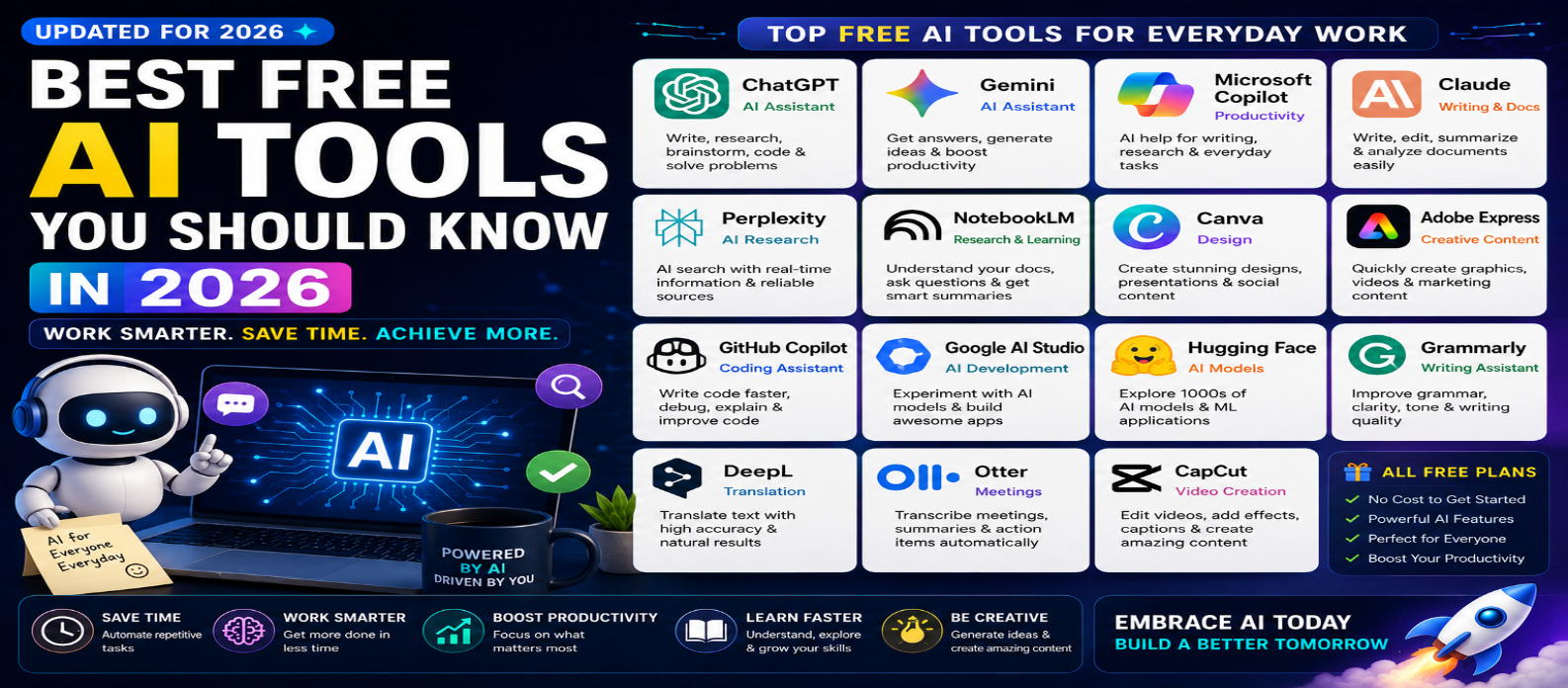
"Discover the best free AI tools you should know in 2026 for writing, research, coding, design, productivity, translation, meetings, video creation, and AI development. Compare popular AI tools and find the right options for your everyday work."
Best Free AI Tools You Should Know in 2026
Artificial intelligence has become one of the most useful technologies for everyday digital work. In 2026, you don't necessarily need an expensive subscription to benefit from AI. Many popular AI platforms provide free access or free tiers that can help with writing, research, coding, design, image creation, productivity, learning, and more.
Whether you're a student, blogger, developer, freelancer, marketer, business owner, or content creator, choosing the right AI tools can save time and simplify everyday tasks.
In this guide, we'll explore some of the best free AI tools you should know in 2026, what they're useful for, and how to choose the right one.
Note: Free plans, features, usage limits, and availability can change over time. Always check the current plan before relying on a tool for regular work.
1. ChatGPT – Best General-Purpose AI Assistant
ChatGPT is a versatile AI assistant that can help with a wide variety of everyday tasks.
You can use it for:
- Writing and editing
- Brainstorming
- Research assistance
- Summarization
- Learning
- Coding
- Data analysis
- Planning
- Problem solving
Its broad range of capabilities makes it useful for both beginners and experienced users.
For better results, provide clear instructions, relevant context, your desired output format, and any important limitations.
2. Google Gemini – Best for Everyday AI Assistance
Gemini is another general-purpose AI assistant suitable for writing, brainstorming, learning, research assistance, and productivity.
Possible uses include:
- Asking questions
- Drafting content
- Summarizing information
- Generating ideas
- Explaining topics
- Planning projects
- Coding assistance
It can be particularly useful for people already working within Google's ecosystem.
3. Microsoft Copilot – Best for Productivity
Microsoft Copilot provides AI assistance across a variety of productivity scenarios.
Users can use AI for tasks such as:
- Research assistance
- Writing
- Brainstorming
- Summarization
- Question answering
- Content creation
For professionals using Microsoft products, Copilot can also fit naturally into existing productivity workflows, depending on the features available under their plan.
4. Claude – Best for Writing and Document Work
Claude is a general-purpose AI assistant that can be particularly useful for working with text and documents.
Common uses include:
- Writing
- Editing
- Summarizing
- Brainstorming
- Explaining concepts
- Analyzing documents
- Coding assistance
For content-heavy tasks, a conversational AI assistant can dramatically reduce the time required to organize and understand information.
5. Perplexity – Best for AI-Powered Research
Perplexity combines conversational AI with web-focused research capabilities.
It can be useful when you want to:
- Research a topic
- Find information quickly
- Explore sources
- Compare information
- Ask follow-up questions
- Discover related topics
Even when using AI-powered research, important claims should be checked against reliable primary sources.
6. NotebookLM – Best for Learning From Your Own Sources
NotebookLM is particularly useful when you want AI assistance based on sources you provide.
It can help users:
- Understand documents
- Summarize material
- Ask questions about sources
- Organize research
- Create study materials
- Explore complex information
This makes it valuable for students, researchers, writers, and professionals working with collections of documents.
7. Canva – Best for AI-Assisted Design
Canva combines traditional visual-design tools with AI-powered features.
Depending on the features available in the free plan, users can create:
- Social media graphics
- Presentations
- Posters
- Blog images
- Marketing materials
- Thumbnails
- Simple videos
It is particularly useful for people who want professional-looking visuals without learning complicated professional design software.
8. Adobe Express – Best for Quick Creative Content
Adobe Express provides tools for quickly creating digital content.
It can be useful for:
- Social graphics
- Posters
- Promotional content
- Videos
- Images
- Marketing assets
AI-assisted creative features can help accelerate tasks such as generating ideas, editing visuals, and creating content variations.
9. GitHub Copilot – Best for AI-Assisted Coding
For developers, AI coding assistants can significantly speed up common programming tasks.
GitHub Copilot can assist with:
- Code suggestions
- Code completion
- Explaining code
- Debugging
- Generating functions
- Writing tests
- Learning unfamiliar code
Availability and limits for free usage can vary, so developers should check the current plan.
AI-generated code should always be reviewed for security, correctness, performance, and maintainability.
10. Google AI Studio – Best for Experimenting With AI
Google AI Studio can be useful for developers and technically curious users who want to experiment with generative AI models.
Possible uses include:
- Testing prompts
- Prototyping AI applications
- Exploring model capabilities
- Testing structured outputs
- Building AI workflows
It can provide a useful bridge between simply using an AI chatbot and developing your own AI-powered application.
11. Hugging Face – Best for Exploring AI Models
Hugging Face provides an ecosystem for discovering and experimenting with machine-learning models and AI applications.
Developers, researchers, and AI enthusiasts can explore technologies involving:
- Natural language
- Image generation
- Computer vision
- Audio
- Machine learning
- Generative AI
Some models and services may require additional computing resources or have usage limitations.
12. Grammarly – Best for AI-Assisted Writing Improvement
Grammarly can help improve everyday writing.
Depending on the plan and available features, it can assist with:
- Grammar
- Spelling
- Clarity
- Tone
- Rewriting
- Sentence improvement
It can be useful for emails, reports, articles, academic writing, and professional communication.
13. DeepL – Best for AI-Assisted Translation
DeepL is widely used for translation and language-related tasks.
It can help with:
- Translating text
- Understanding foreign-language content
- Improving multilingual communication
- Working with international content
AI translation is powerful, but important legal, technical, or business documents may still require professional human review.
14. Otter – Best for Meeting Transcription
AI transcription tools such as Otter can help convert conversations into searchable text.
Depending on free-plan availability, features can help with:
- Meeting transcription
- Notes
- Summaries
- Action items
- Conversation search
Always consider participant consent, privacy, and organizational policies before recording meetings.
15. CapCut – Best for AI-Assisted Video Creation
CapCut provides video-editing tools alongside various AI-assisted capabilities.
Creators can use it for:
- Short videos
- Social media content
- Captions
- Video editing
- Templates
- Visual effects
Some advanced or AI-powered features may require paid access, so check current limits before starting a project.
Which Free AI Tool Is Best?
There isn't one AI tool that is best for every task.
A practical selection might look like:
| Task | AI Tool to Explore |
|---|---|
| General AI Assistant | ChatGPT |
| Everyday Assistance | Gemini |
| Productivity | Microsoft Copilot |
| Writing & Documents | Claude |
| Web Research | Perplexity |
| Source-Based Research | NotebookLM |
| Graphic Design | Canva |
| Creative Content | Adobe Express |
| Coding | GitHub Copilot |
| AI Development | Google AI Studio |
| AI Models | Hugging Face |
| Writing Improvement | Grammarly |
| Translation | DeepL |
| Meeting Notes | Otter |
| Video Creation | CapCut |
How to Choose the Right Free AI Tool
Before choosing a tool, consider:
Purpose → Free Limits → Output Quality → Privacy → Ease of Use → Integrations
Avoid signing up for dozens of AI tools simply because they're free.
Instead, identify the tasks you perform frequently and select a small collection of tools that genuinely improve your workflow.
Are Free AI Tools Really Free?
"Free" doesn't always mean unlimited.
A free AI plan may include:
- Daily or monthly usage limits
- Limited access to advanced models
- Fewer premium features
- Storage restrictions
- Limited generations
- Lower priority during busy periods
Some platforms use a freemium model, where basic functionality is free while advanced features require payment.
Always review the latest plan before depending on a specific feature.
Safety Tips When Using Free AI Tools
Never enter highly sensitive information into an AI service without understanding its privacy and data-handling policies.
Be careful with:
- Passwords
- API keys
- Banking information
- Confidential documents
- Customer data
- Private company information
You should also verify important AI-generated information before publishing it or using it for important decisions.
Conclusion
The best free AI tools in 2026 can help with almost every area of digital work—from writing and research to coding, design, translation, meetings, video creation, and AI development.
Tools such as ChatGPT, Gemini, Microsoft Copilot, Claude, Perplexity, NotebookLM, Canva, Adobe Express, GitHub Copilot, Google AI Studio, Hugging Face, Grammarly, DeepL, Otter, and CapCut each serve different purposes.
Instead of looking for one AI tool that does everything, build a small AI toolkit based on the work you actually do.
Used thoughtfully, free AI tools can help you save time, learn faster, automate repetitive work, and accomplish more without significantly increasing your costs.
Get a Free Access To 200+ Free Tools:
|
Home Page |
|
|
Calculator Tools |
|
|
Text & Converter Tools |
|
|
PDF & Image Tools |
|
|
Games & Developer Tools |
|
|
Resume Builder |