
Canonical URLs Explained: Complete SEO Guide
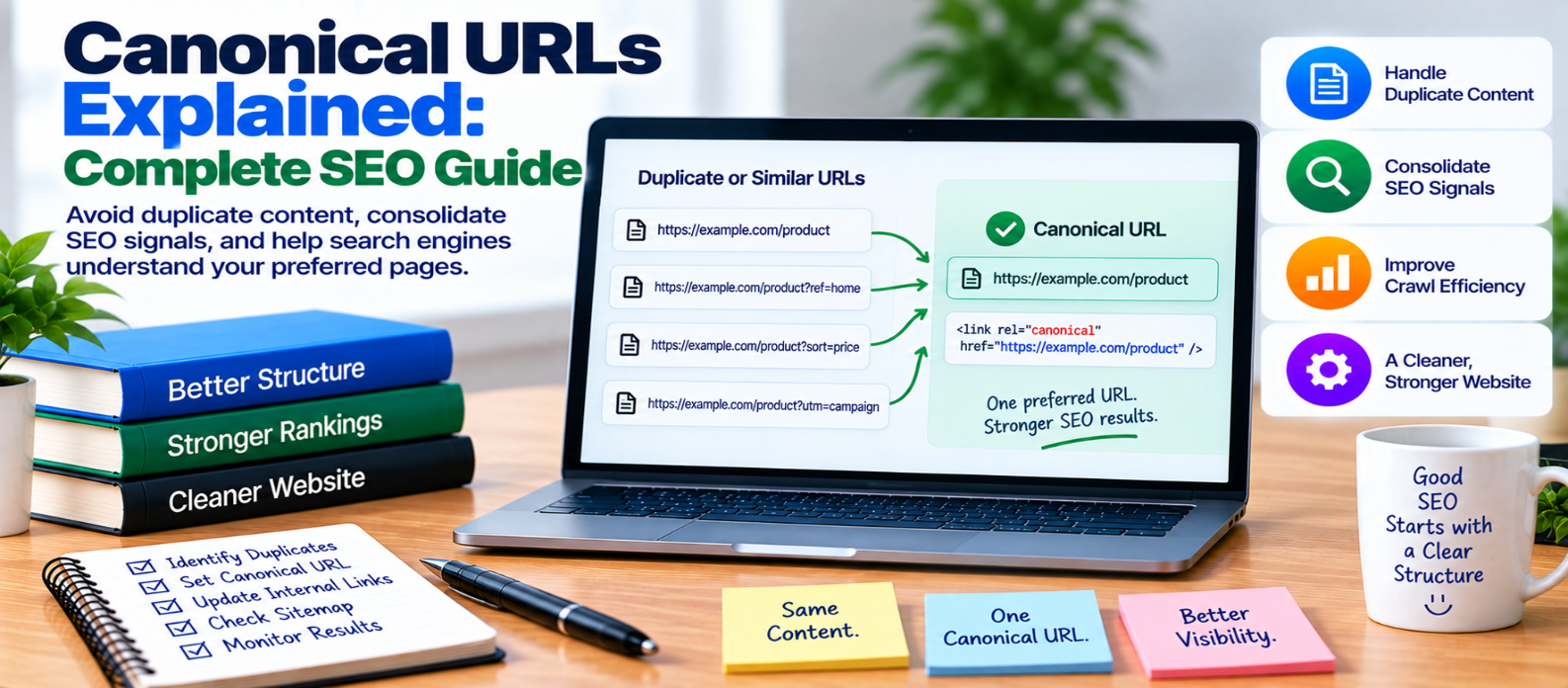
"Learn what canonical URLs are, how rel="canonical" works, when to use self-referencing and cross-domain canonicals, and how to avoid duplicate-content, sitemap, redirect, pagination, and indexing mistakes."
Canonical URLs Explained: Complete SEO Guide
A website can sometimes make the same or very similar content available through multiple URLs.
For example:
example.com/shoes
example.com/shoes?sort=price
example.com/shoes?ref=homepage
If these URLs contain essentially the same primary content, search engines need to determine which version should represent that content.
A canonical URL helps communicate your preferred version.
Canonicalization is an important part of technical SEO, but it is often misunderstood. A canonical tag is a strong signal—not an absolute command.
What Is a Canonical URL?
A canonical URL is the URL you prefer search engines to treat as the representative version of a set of duplicate or highly similar pages.
It is commonly declared using:
<link rel="canonical" href="https://example.com/shoes/" />This element normally appears inside the page's <head>.
It tells search engines, in effect:
This is the preferred URL representing this content.
Why Do Duplicate URLs Exist?
Duplicate URLs don't necessarily mean someone copied your content.
They can be created naturally by website functionality.
Common causes include:
- Tracking parameters
- Sorting options
- Filtering
- HTTP and HTTPS versions
- Multiple hostname variations
- Session parameters
- Print versions
- CMS-generated URLs
- Product variants
- Syndicated content
For example:
/product/laptop/
/product/laptop/?ref=email
/product/laptop/?campaign=sale
may all display substantially the same product.
Without consistent canonicalization, search engines must decide how those URLs relate to each other.
What Is a Self-Referencing Canonical?
A unique page can point its canonical tag to itself.
Example:
Page:
https://example.com/seo-guide/Canonical:
<link rel="canonical"
      href="https://example.com/seo-guide/" />
This is called a self-referencing canonical.
It can help reinforce the preferred URL and make canonicalization more consistent when parameters or other variations appear.
How Canonicalization Works
Suppose three URLs contain duplicate content:
URL A ─┐
URL B ─┼──→ Preferred URL A
URL C ─┘
Pages B and C can reference A as canonical.
Search engines may then consolidate signals associated with those duplicate versions and choose a representative URL.
However, search engines can select a different canonical if other signals strongly contradict your declared preference.
Canonical Tags Are Signals
This distinction matters.
Adding:
rel="canonical"doesn't force a search engine to select that URL.
Search systems can consider multiple signals, including:
- Canonical declarations
- Redirects
- Internal links
- Sitemap URLs
- HTTPS preference
- Content similarity
- Other site signals
Your technical SEO should therefore communicate the same preferred URL consistently.
Canonical vs Redirect
Canonicalization and redirects solve related but different problems.
Canonical
Both URLs can remain accessible:
URL B
 ↓
Canonical signal
 ↓
URL A preferred
Redirect
Visitors and crawlers requesting URL B are sent to URL A:
URL B
 ↓
Redirect
 ↓
URL A
If an old URL has permanently moved and users no longer need the old version, a permanent redirect may be more appropriate.
If multiple useful URL variations need to remain accessible, canonicalization may be appropriate.
Canonical vs Noindex
These controls also serve different purposes.
Canonical: communicates the preferred representative among duplicate or very similar URLs.
Noindex: requests that a page not appear in search results after the directive is processed.
Don't treat them as interchangeable.
If a page is a duplicate but still useful to visitors, canonicalization may make sense.
If a page shouldn't appear in search at all, an indexing-control strategy may be more appropriate.
Keep Internal Links Consistent
Suppose your canonical URL is:
https://example.com/guides/seo/but most internal links point to:
https://example.com/guides/seo/?source=navYou're creating inconsistent signals.
Where practical, internal links should point directly to canonical URLs.
This also avoids unnecessary duplicate crawling.
Keep XML Sitemaps Consistent
Your XML sitemap should normally contain the canonical URLs you want search engines to discover and consider for indexing.
Avoid:
Sitemap → URL A
Canonical → URL B
Internal links → URL C
Prefer:
Sitemap ───────┐
Internal Links ├──→ URL A
Canonical ─────┘
Consistency makes your preferred site structure clearer.
Canonicalize HTTP and HTTPS Correctly
If your site uses HTTPS, avoid accidentally declaring an HTTP version as canonical.
For example, an HTTPS page shouldn't normally contain:
<link rel="canonical" href="http://example.com/page/" />when the intended canonical page is:
https://example.com/page/Review canonical tags after HTTPS migrations.
Cross-Domain Canonicals
Canonical URLs can sometimes point to a URL on another domain.
This may be useful when substantially duplicate content is legitimately published across different sites and one version should be treated as preferred.
However, cross-domain canonicalization should be deliberate.
Don't point pages to another domain simply because that site covers a similar topic. Canonicals are designed for duplicate or highly similar content relationships.
Pagination and Canonicals
A common mistake is canonicalizing every page in a paginated sequence to page one even though each page contains different items.
For example:
/category/?page=1
/category/?page=2
/category/?page=3
If each page exposes distinct useful content, blindly canonicalizing all of them to page one can misrepresent their relationship.
Evaluate what each URL actually contains before choosing canonical rules.
Common Canonical URL Mistakes
Canonicalizing Everything to the Homepage
Individual pages should not point to the homepage simply because it is the most important page.
Creating Canonical Chains
Avoid:
Page C → Page B → Page APrefer pointing duplicates directly to the intended canonical:
Page C ─┐
Page B ─┴→ Page A
Canonicalizing to Broken URLs
The canonical destination should be a valid, useful page.
Using Relative Logic Incorrectly
Automatically generated canonicals can produce incorrect URLs when templates or environments are misconfigured.
Contradicting Other Signals
Don't declare one URL canonical while repeatedly promoting another version through sitemaps and internal links.
Forgetting Canonicals During Migration
Domain changes, HTTPS migrations, URL redesigns, and staging-to-production deployments can leave outdated canonical tags behind.
Canonical URL Checklist
Before publishing, verify:
-
Important pages have appropriate canonical URLs
-
Canonicals use the preferred HTTPS version
-
Self-referencing canonicals are accurate
-
Duplicate pages point to the intended representative
-
Canonical destinations return valid content
-
Internal links use canonical URLs
-
XML sitemaps contain canonical versions
-
Canonical chains are avoided
-
Homepage canonicals aren't used incorrectly
-
Parameter URLs are handled consistently
-
Pagination isn't blindly canonicalized
-
Cross-domain canonicals are intentional
-
Staging domains aren't referenced
-
Canonicals are checked after migrations
-
Generated tags are periodically audited
Conclusion
Canonical URLs help search engines understand which URL should represent duplicate or highly similar content.
A strong canonical strategy looks like:
Duplicate URLs
      ↓
Preferred Canonical
      +
Consistent Internal Links
      +
Consistent Sitemap
      +
Consistent Redirect Strategy
Don't use canonical tags as a universal fix for every indexing problem.
First understand why duplicate URLs exist. Then decide which version should represent the content and make your technical signals consistent.
The goal of canonicalization isn't to hide duplicate URLs—it is to clearly communicate which URL should be treated as the primary version of the content.
Get a Free Access To 200+ Free Tools:
|
Home Page |
|
|
Calculator Tools |
|
|
Text & Converter Tools |
|
|
PDF & Image Tools |
|
|
Games & Developer Tools |
|
|
Resume Builder |