
The Complete Web Developer Roadmap for 2026
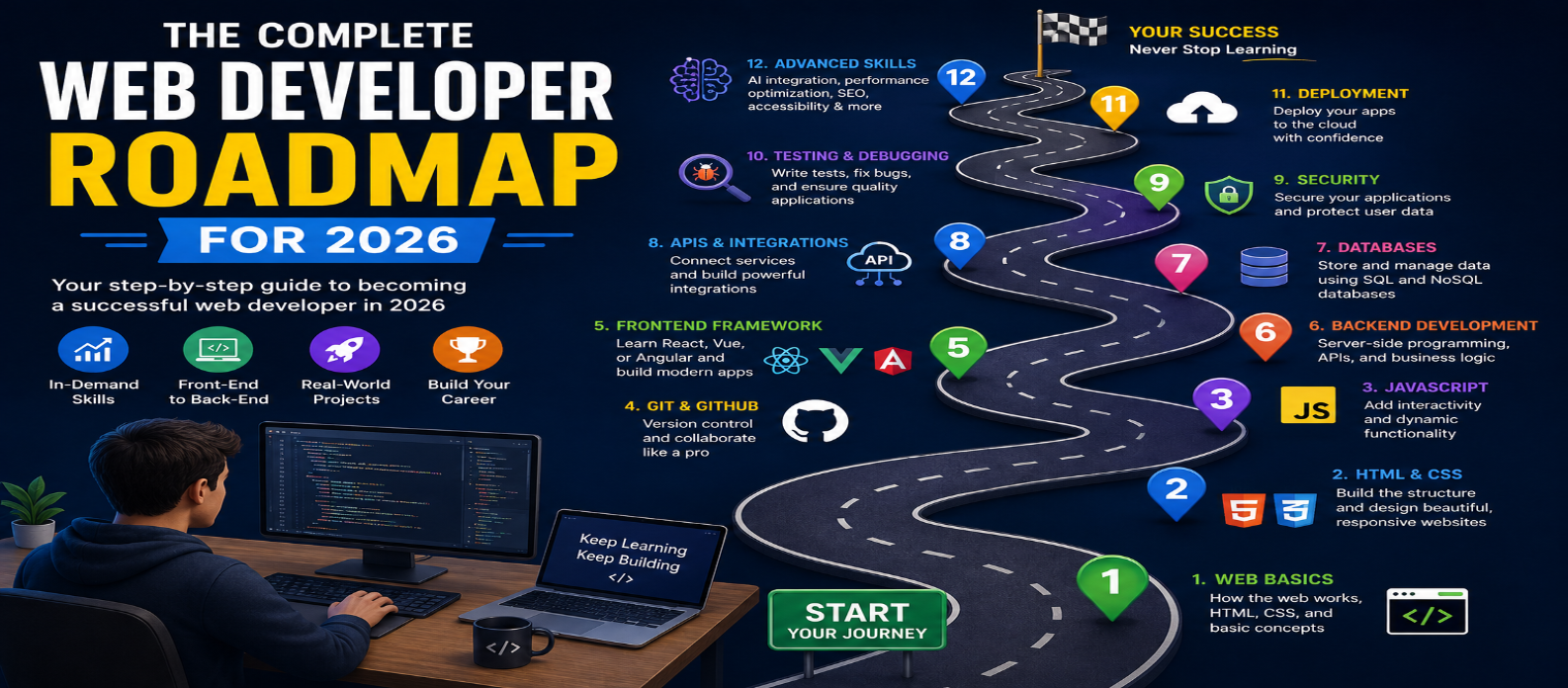
"Follow the complete web developer roadmap for 2026 and learn HTML, CSS, JavaScript, frontend, backend, databases, APIs, Git, security, deployment, SEO, performance, AI, and real-world project development step by step."
The Complete Web Developer Roadmap for 2026
Web development remains one of the most valuable technology skills to learn in 2026. However, the field has expanded significantly beyond basic HTML, CSS, and JavaScript. Modern developers need to understand frontend development, backend programming, databases, APIs, Git, deployment, security, performance, and increasingly, artificial intelligence.
If you're wondering how to become a web developer in 2026, this roadmap provides a practical step-by-step path from beginner to professional developer.
What Is a Web Developer Roadmap?
A web developer roadmap is a structured learning path that shows what technologies, programming languages, tools, and concepts you should learn and in what order.
You don't need to learn everything at once. The best approach is to build a strong foundation first and gradually move toward advanced technologies.
Step 1: Learn How the Web Works
Before writing code, understand the basics of the internet.
Learn about:
- Websites and web applications
- Browsers and servers
- HTTP and HTTPS
- Domains and DNS
- Web hosting
- APIs
- Databases
- Client-side vs server-side development
Understanding these concepts makes advanced web development much easier.
Step 2: Master HTML
HTML (HyperText Markup Language) provides the structure of a webpage.
Start with:
- HTML elements and attributes
- Headings and paragraphs
- Links and images
- Lists and tables
- Forms
- Semantic HTML
- Audio and video
- Accessibility fundamentals
Don't rush through HTML. Good HTML creates a strong foundation for SEO, accessibility, and responsive design.
Step 3: Learn CSS
CSS controls the appearance and layout of websites.
Focus on:
- Selectors
- Colors and typography
- Box model
- Flexbox
- CSS Grid
- Positioning
- Responsive design
- Media queries
- Animations and transitions
- CSS variables
Your goal should be to build websites that work well on mobile, tablet, and desktop screens.
Step 4: Learn JavaScript
JavaScript is one of the most important programming languages for modern web development.
Learn:
- Variables and data types
- Functions
- Arrays and objects
- Loops and conditions
- DOM manipulation
- Events
- Modules
- Error handling
- Promises
- Async/await
- Fetch API
- JSON
- Browser APIs
Once you understand JavaScript fundamentals, you can move toward modern frontend frameworks.
Step 5: Learn Git and GitHub
Git helps developers track changes in their code, while platforms such as GitHub make collaboration and code sharing easier.
Learn basic commands and concepts such as:
- Repository
- Commit
- Branch
- Merge
- Pull request
- Clone
- Push and pull
- Version control
Git is an essential skill for professional development workflows.
Step 6: Choose a Frontend Framework
After learning JavaScript, choose one modern frontend framework or library.
Popular options include:
- React
- Vue
- Angular
- Svelte
Don't try to master every framework simultaneously. Choose one and learn how to build real projects with it.
You should understand components, state management, routing, forms, API integration, and application structure.
Step 7: Learn Backend Development
Backend development handles server-side logic, authentication, databases, APIs, and application processing.
You can start with technologies such as:
- Node.js
- Python
- PHP
- Java
- C#
If you already know JavaScript, Node.js can be a natural starting point because you can use JavaScript on both the frontend and backend.
Step 8: Learn Databases
Modern web applications usually need a database to store information.
Learn the difference between:
SQL databases: PostgreSQL, MySQL, SQL Server
NoSQL databases: MongoDB and similar database systems
Start by understanding tables, records, relationships, queries, indexes, and basic database design.
Step 9: Learn APIs
APIs allow different software systems to communicate.
Learn:
- REST APIs
- HTTP methods
- JSON
- Authentication
- API requests and responses
- Status codes
- API security
- Basic API documentation
Understanding APIs is essential for connecting frontend applications with backend services.
Step 10: Learn Authentication and Security
Security should not be an afterthought.
Learn about:
- Authentication
- Authorization
- Password hashing
- Sessions
- Tokens
- HTTPS
- CORS
- XSS
- CSRF
- SQL injection
- Secure API design
You don't need to become a cybersecurity specialist, but every developer should understand basic web security.
Step 11: Learn Testing and Debugging
Professional developers don't just write code—they test it.
Learn:
- Browser developer tools
- Unit testing
- Integration testing
- End-to-end testing
- Error handling
- Debugging techniques
- Performance testing
Developing strong debugging skills can save hours of development time.
Step 12: Learn Deployment and Cloud Basics
Eventually, you need to make your applications available online.
Learn about:
- Web hosting
- Domains
- DNS
- SSL certificates
- CI/CD
- Environment variables
- Cloud platforms
- Server deployment
- Monitoring
Start with simple deployment platforms before moving into advanced cloud infrastructure.
Step 13: Learn SEO, Accessibility and Performance
A professional website should not only work—it should be fast, accessible, discoverable, and user-friendly.
Learn:
- Technical SEO
- Semantic HTML
- Structured data
- Core Web Vitals
- Image optimization
- Caching
- Responsive design
- Web accessibility
- Website performance optimization
These skills can make a major difference to real-world websites.
Step 14: Learn AI-Powered Development
AI is becoming an important part of modern development workflows.
Learn how to use AI for:
- Code generation
- Debugging
- Documentation
- Testing
- UI development
- Code review
- Research
- Automation
- AI-powered website features
You should also learn how to verify AI-generated code, rather than blindly copying it into production projects.
Step 15: Build Real Projects
Projects are more valuable than simply completing tutorials.
Start with projects such as:
- Personal portfolio website
- Responsive landing page
- Blog website
- To-do application
- Weather application
- E-commerce frontend
- REST API
- Full-stack application
- Authentication system
- AI-powered web application
Document your projects and publish them online.
Web Developer Roadmap: Quick Summary
The recommended learning sequence is:
Internet Basics → HTML → CSS → JavaScript → Git → Frontend Framework → Backend → Databases → APIs → Security → Testing → Deployment → SEO & Performance → AI → Real-World Projects
You don't need to follow this roadmap perfectly. The technologies you choose can change depending on your career goals.
How Long Does It Take to Become a Web Developer?
The timeline depends on your previous experience and how consistently you study.
A beginner who studies regularly may build basic websites within a few months. Becoming job-ready for professional development generally takes longer because it requires practical projects, debugging experience, development workflows, and a deeper understanding of software engineering.
The key is consistent practice rather than trying to learn every technology quickly.
Conclusion
The complete web developer roadmap for 2026 starts with HTML, CSS, and JavaScript and gradually expands into frontend frameworks, backend development, databases, APIs, security, testing, deployment, SEO, performance, and AI.
You don't need to master every technology available. Choose a practical stack, build real projects, learn from your mistakes, and continuously improve your skills.
The best web developers in 2026 won't simply know how to write code—they'll know how to use modern tools, solve problems, build secure and accessible applications, and use AI effectively without losing fundamental technical skills.
Get a Free Access To 200+ Free Tools:
|
Home Page |
|
|
Calculator Tools |
|
|
Text & Converter Tools |
|
|
PDF & Image Tools |
|
|
Games & Developer Tools |
|
|
Resume Builder |