
Google Search Console: Complete Beginner's Guide for 2026
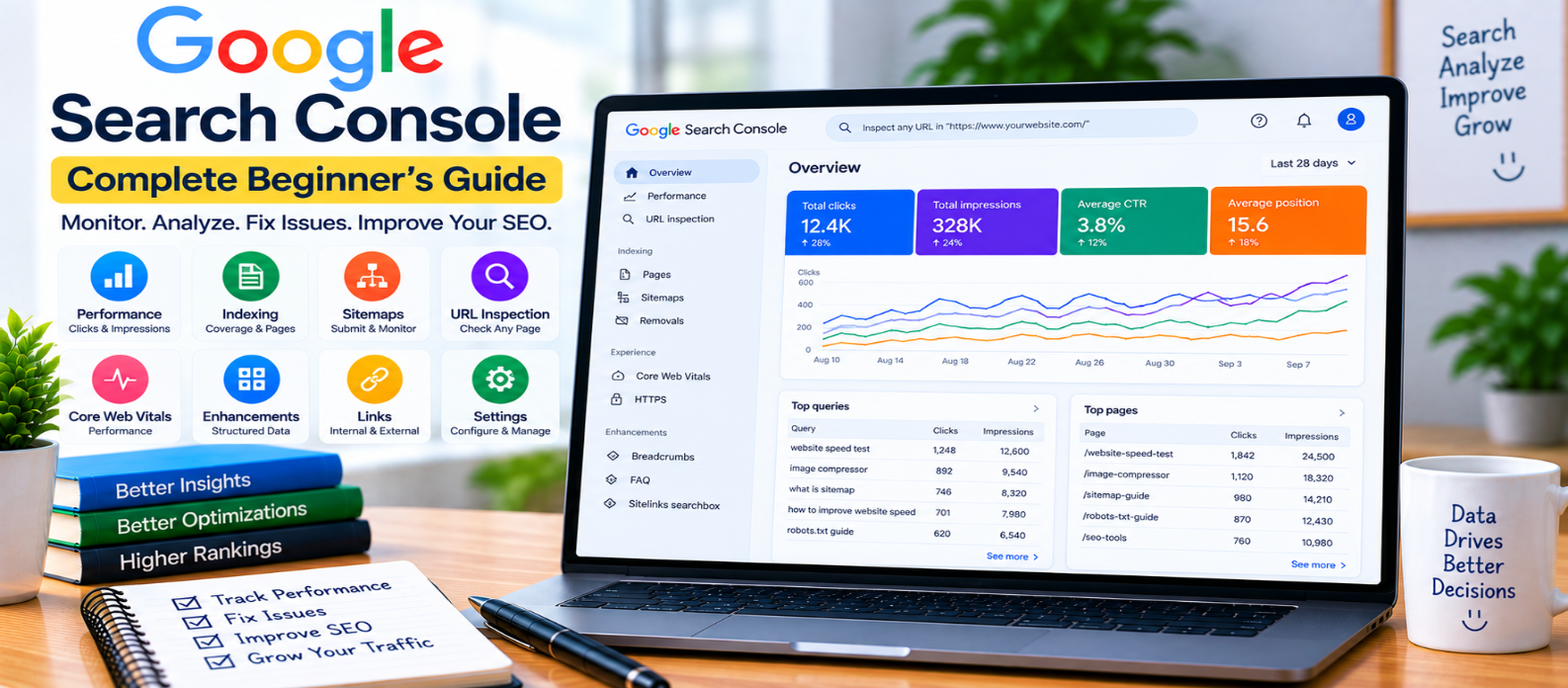
"Learn how to use Google Search Console to monitor clicks, impressions, search queries, pages, indexing, XML sitemaps, URL Inspection, Core Web Vitals, structured data, links, and important SEO performance changes."
Google Search Console: Complete Beginner's Guide
Publishing a website is only the beginning. Once pages are live, website owners need to understand whether Google can discover them, how they appear in search, which queries generate visibility, and whether technical problems are affecting important URLs.
Google Search Console is a free service designed to provide this information.
It won't automatically improve rankings, but it can show you valuable search-performance and indexing data that helps you make better SEO decisions.
What Is Google Search Console?
Google Search Console, often shortened to GSC, helps website owners monitor their site's presence in Google Search.
Depending on the site and available data, you can use it to investigate:
- Search clicks
- Impressions
- Search queries
- Pages appearing in search
- Indexing status
- Sitemap processing
- Individual URLs
- Core Web Vitals
- Structured-data related reports
- Internal and external links
Think of it as a diagnostic and measurement tool rather than an automatic SEO optimizer.
Set Up and Verify Your Website
Before accessing site-specific information, you need to prove that you control the website.
Search Console supports different property and verification approaches.
A Domain property can cover multiple protocols and subdomains associated with the verified domain, while a URL-prefix property applies to the specified URL prefix.
Verification methods depend on the property type and may involve DNS or other supported methods.
After verification, data may take time to appear.
Understand the Performance Report
The Performance report is one of the most useful areas for everyday SEO work.
Important metrics include:
Clicks
How many times users clicked through to your website from applicable Google Search results.
Impressions
How often a link to your site was shown in eligible search results.
Click-Through Rate
CTR compares clicks with impressions:
CTR = Clicks ÷ Impressions × 100For example:
1,000 impressions
50 clicks

CTR = 5%
Average Position
This reports positioning information based on the highest-positioned result from your property under Google's measurement methodology.
Don't treat average position as a perfectly fixed ranking. Search results can vary by query, location, device, time, and other factors.
Discover Queries Bringing Visibility
The Queries view shows searches associated with your site's search appearances.
Suppose an article about image optimization receives impressions for:
how to optimize website images
best image format for websites
reduce image size for website
WebP vs JPEG
This can reveal how Google currently connects your page with different searches.
Use this information to understand existing visibility—not to stuff every query into the article.
If an important related question isn't adequately answered, consider improving the page naturally.
Analyze Performance by Page
You can also investigate individual pages.
A page-level view can help answer:
- Which articles receive search traffic?
- Which pages are gaining visibility?
- Which pages have many impressions but relatively few clicks?
- Which pages lost clicks compared with an earlier period?
- What queries lead to a particular page?
For example:
Page
 ↓
Check Queries
 ↓
Understand Search Intent
 ↓
Review Content
 ↓
Improve Where Useful
Avoid changing a successful page solely because one metric fluctuated for a few days. Look for meaningful patterns.
Compare Time Periods
SEO performance makes more sense in context.
Instead of looking only at today's number, compare periods such as:
Recent Period
      vs
Previous Period
You can investigate changes in clicks, impressions, CTR, queries, pages, countries, and devices where those dimensions are available.
Remember that seasonality, news, demand, website changes, and search-result changes can all affect performance.
A decline doesn't automatically mean your site received a penalty.
Check Page Indexing
Search Console provides indexing information that can help identify which URLs Google has or hasn't indexed and why.
Not every URL on a website needs to be indexed.
Examples that may reasonably remain outside the index include:
- Duplicate URLs
- Redirects
- Certain alternate pages
- Intentionally excluded content
Focus on important pages that should be indexable but aren't.
Before trying to fix anything, understand the reported reason.
Use URL Inspection
The URL Inspection tool lets you investigate a specific URL.
It can provide information about Google's knowledge of that page and can help you examine issues involving:
- Indexing
- Crawling
- Canonicalization
- Page discovery
- Availability
This is particularly useful after publishing or troubleshooting an important page.
Don't repeatedly request indexing as a substitute for good internal linking, crawlability, useful content, and a clean sitemap.
Submit and Monitor XML Sitemaps
Search Console lets you submit sitemap locations and monitor their processing.
A sitemap can help Google discover important canonical URLs.
Your sitemap should ideally contain pages that are:
Useful
  +
Canonical
  +
Indexable
  +
Successfully Accessible
Submitting a sitemap doesn't guarantee that every URL inside it will be indexed.
If many sitemap URLs aren't indexed, investigate the reasons rather than repeatedly resubmitting the same file.
Monitor Core Web Vitals
Search Console can provide Core Web Vitals reporting based on real-world usage data where sufficient data exists.
The key metrics are:
- LCP – loading performance
- INP – responsiveness
- CLS – visual stability
These reports can help identify groups of URLs experiencing similar problems.
Use performance tools and page-level testing to diagnose the actual causes before making changes.
Review Structured Data and Enhancements
For supported search features, Search Console may provide reports related to structured data or enhancements detected on your website.
Problems might involve:
- Missing required information
- Invalid values
- Incorrect markup
- Other eligibility issues
Fix structured data because it inaccurately describes the page or prevents valid feature eligibility—not simply to make every report show zero warnings.
Understand the Links Report
Search Console can provide information about links associated with your property, including external and internal links.
Internal-link data can help you identify whether important pages are well connected within your website.
External-link information can help you understand some of the websites and pages linking to your content.
Don't obsess over the total number of links. Relevance and genuine editorial value matter more than simply increasing counts.
A Practical Weekly GSC Routine
You don't need to inspect every report every day.
A useful routine could be:
- Check overall search performance.
- Look for meaningful click or impression changes.
- Review important pages.
- Examine queries behind major changes.
- Check significant indexing problems.
- Review newly published important URLs.
- Monitor sitemap problems.
- Investigate technical reports when issues appear.
The goal is to find actionable information, not to watch graphs constantly.
Common Search Console Mistakes
Avoid:
- Treating impressions as visits
- Assuming every unindexed URL is a problem
- Expecting sitemap submission to guarantee indexing
- Requesting indexing repeatedly
- Stuffing queries found in GSC into articles
- Panicking over short-term ranking fluctuations
- Treating average position as a fixed rank
- Making major changes from one day's data
- Ignoring search intent when analyzing queries
- Chasing perfect reports instead of fixing meaningful problems
Beginner Search Console Checklist
After setting up GSC, check:
-
Website ownership is verified
-
Correct property is being monitored
-
Search performance data is reviewed
-
Important queries are understood
-
High-value pages are monitored
-
Period comparisons are used
-
Important indexing problems are investigated
-
Key URLs are inspected when necessary
-
XML sitemap is submitted and monitored
-
Core Web Vitals are reviewed
-
Structured-data issues are investigated
-
Internal links are monitored
-
Major changes are evaluated over meaningful periods
Conclusion
Google Search Console becomes most useful when you treat it as a decision-support tool.
A practical workflow is:
Measure
   ↓
Identify Change
   ↓
Investigate Queries & Pages
   ↓
Find the Cause
   ↓
Make a Useful Improvement
   ↓
Measure Again
Don't optimize simply because a graph moved.
Use Search Console to understand how your website appears in Google Search, identify genuine technical or content opportunities, and measure whether your improvements actually help.
The value of Search Console isn't the amount of data it provides—it's your ability to turn the right data into better website decisions.
Get a Free Access To 200+ Free Tools:
|
Home Page |
|
|
Calculator Tools |
|
|
Text & Converter Tools |
|
|
PDF & Image Tools |
|
|
Games & Developer Tools |
|
|
Resume Builder |