
How to Add AI Features to Your Website: Complete Guide for 2026
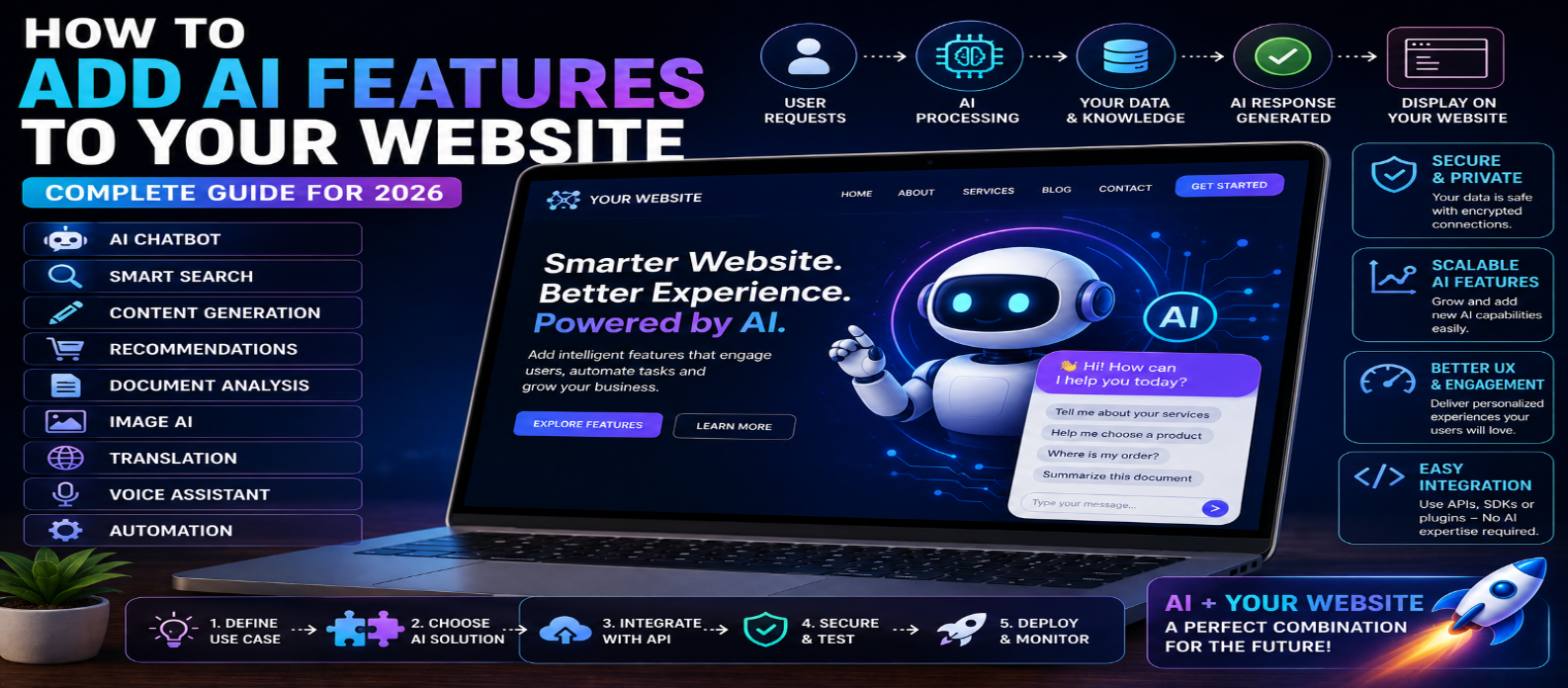
"Learn how to add AI features to your website in 2026, including AI chatbots, smart search, RAG, content generation, recommendations, document analysis, image AI, and translation, with practical guidance on APIs, security, privacy, costs, testing, and deployment."
How to Add AI Features to Your Website: Complete Guide for 2026
Artificial intelligence is transforming websites from static information platforms into interactive, intelligent digital experiences. In 2026, website owners can add AI features that answer questions, generate content, improve search, recommend products, analyze documents, personalize experiences, and automate customer support.
You don't necessarily need to build an AI model from scratch. Most websites can integrate AI through APIs, pre-built AI services, plugins, or custom backend integrations.
Whether you run a blog, business website, SaaS platform, online store, or web application, this guide explains how to add AI features to your website step by step.
What Are AI Website Features?
AI website features are functions powered by artificial intelligence rather than relying entirely on traditional predefined rules.
Examples include:
- AI chatbots
- Smart search
- Content generation
- Product recommendations
- Document summarization
- Image analysis
- Translation
- Personalized content
- AI customer support
- Voice interaction
- Data analysis
- AI assistants
The right feature depends on your website's purpose and what your visitors actually need.
Why Add AI to Your Website?
AI shouldn't be added simply because it is popular.
A useful AI feature should solve a real problem.
For example:
Visitors can't find information → Add AI search
Support team receives repetitive questions → Add AI support
Users need customized results → Add AI recommendations
Users work with large documents → Add AI summarization
When implemented correctly, AI can help improve user experience, productivity, engagement, and automation.
1. Start With a Clear AI Use Case
Before choosing an AI technology, identify exactly what you want the feature to accomplish.
Ask:
- Who will use it?
- What problem does it solve?
- What information does it need?
- What should the output look like?
- What happens when AI is wrong?
Avoid starting with:
"I want AI on my website."
Instead, define a specific objective:
"I want visitors to ask questions about my products and receive answers based only on my product information."
This makes development much easier.
2. Choose the Right AI Integration Method
There are several ways to add AI capabilities to a website.
AI API
Your website sends requests to an AI service through an API.
A common architecture is:
Visitor → Website → Your Backend → AI API → Your Backend → Visitor
This approach provides flexibility and is suitable for custom web applications.
Plugins or Extensions
Some website platforms provide plugins that add AI functionality with less coding.
These can be useful for simpler integrations, but check their security, privacy, performance, maintenance, and costs.
Custom AI Models
Advanced businesses may deploy or customize models for specialized requirements.
This provides more control but usually requires greater technical expertise and infrastructure.
3. Build an AI Chatbot
An AI chatbot is one of the most common website AI features.
It can help visitors:
- Find information
- Understand products
- Navigate services
- Answer FAQs
- Get basic support
- Discover relevant content
A basic chatbot workflow is:
User Question → Backend → AI Model → Generated Answer → Chat Interface
For business websites, the chatbot should have clear instructions about what it can and cannot answer.
4. Connect AI to Your Website Content
A generic AI model may not know the latest information about your business or website.
To answer questions using your own content, you can use Retrieval-Augmented Generation (RAG).
A simplified workflow is:
Question → Search Your Knowledge Base → Retrieve Relevant Information → Send Context to AI → Generate Answer
Your knowledge base might contain:
- Website pages
- FAQs
- Product information
- Documentation
- Help articles
- Internal knowledge
This can make an AI assistant more relevant to your website.
5. Add AI-Powered Search
Traditional site search often depends heavily on exact keywords.
AI-powered search can potentially understand meaning and user intent.
For example, instead of searching:
"refund policy"
a visitor might ask:
"Can I return something I bought two weeks ago?"
An intelligent search system can retrieve relevant information even when the wording doesn't exactly match the page.
This can be especially useful for websites with large amounts of content.
6. Add AI Content Generation
Some websites can benefit from letting users generate content.
Examples include:
- Writing assistants
- Product-description generators
- Email generators
- Resume tools
- SEO description generators
- Social-media caption generators
The workflow might be:
User Input → AI Processing → Generated Draft → User Reviews/Edits
Add clear limits to prevent excessive or abusive usage.
7. Add AI Recommendations
AI can help personalize recommendations based on relevant information.
Examples include:
Online Store → Product Recommendations
Blog → Related Articles
Learning Platform → Recommended Lessons
Media Website → Suggested Content
Recommendations should genuinely help users rather than simply increase the number of items displayed.
8. Add Document Analysis
If your website accepts documents, AI can help users interact with their contents.
Possible features include:
- Summarization
- Question answering
- Information extraction
- Document comparison
- Classification
File uploads require strong security controls.
Validate file types, restrict sizes, manage storage carefully, and protect user information.
9. Add Image Understanding or Generation
Multimodal AI allows websites to work with images.
Depending on your application, users may be able to:
- Analyze an uploaded image
- Generate image descriptions
- Extract useful information
- Create images from text
- Edit supported images
Image features can be particularly useful for creative platforms, e-commerce, accessibility tools, and productivity applications.
10. Add AI Translation
AI-powered translation can help websites serve users across multiple languages.
Potential applications include:
- Translating user-generated content
- Multilingual customer support
- Document translation
- Communication tools
For important legal, medical, financial, or contractual information, professional human review may still be necessary.
11. Keep API Keys on the Server
One of the most important security rules is:
Never expose private AI API keys in frontend JavaScript.
Browser code can be inspected by users.
Instead, use:
Frontend → Your Secure Backend → AI Provider
Store credentials using secure environment variables or an appropriate secrets-management system.
12. Add Rate Limits and Usage Controls
AI services can generate usage costs.
A public endpoint without restrictions could be abused.
Consider:
- User authentication
- Request limits
- Input-length limits
- Output limits
- Daily quotas
- Usage monitoring
- Abuse detection
For paid applications, track usage by account or subscription tier.
13. Protect User Privacy
Before sending user information to an AI service, understand what data is being processed and how it is handled.
Avoid unnecessarily sending:
- Passwords
- Payment credentials
- Private personal information
- Confidential documents
- Authentication tokens
- Business secrets
Collect and process only the information your feature actually requires.
14. Design for AI Errors
AI output isn't guaranteed to be correct.
Your website should be designed around this reality.
Consider:
- Showing appropriate disclaimers
- Allowing users to retry
- Providing source references where appropriate
- Adding human support
- Validating structured outputs
- Restricting high-risk actions
Never give an AI feature unlimited authority over sensitive website operations.
15. Optimize AI Response Speed
AI features can feel slow compared with traditional website interactions.
Improve the experience using:
- Loading indicators
- Streaming responses where supported
- Efficient prompts
- Appropriate model selection
- Caching where suitable
- Optimized retrieval
- Smaller context when possible
Users should always know that their request is being processed.
16. Test Before Launching
Test more than normal requests.
Try:
Normal Questions → Long Inputs → Empty Inputs → Unexpected Requests → Errors → Repeated Requests → Mobile Devices
Also test what happens when the AI service is unavailable.
Your website should fail gracefully instead of breaking.
17. Monitor AI After Launch
AI features require ongoing monitoring.
Track:
- Usage
- Response quality
- Errors
- Costs
- Latency
- User feedback
- Failed requests
- Abuse patterns
Use this information to improve prompts, retrieval systems, interfaces, and limits.
Example AI Website Architecture
A practical architecture could look like:
User → Website Interface → Backend API → Authentication & Rate Limiting → AI Model / Knowledge Base → Response Validation → User
This keeps sensitive logic on the server and gives you greater control over security and costs.
Best AI Features for Different Websites
| Website Type | Useful AI Features |
|---|---|
| Blog | AI search, article discovery |
| E-commerce | Product recommendations, support |
| Business Website | AI chatbot, lead assistance |
| SaaS | AI assistant, automation |
| Education | AI tutor, quizzes, summaries |
| Developer Website | Code assistant, documentation search |
| Content Platform | Writing and image tools |
AI Website Integration Checklist
Before launching, check:
Useful Feature → Secure Backend → Protected API Keys → Authentication → Rate Limits → Privacy → Error Handling → Mobile UI → Cost Monitoring → Human Oversight
Don't skip these steps simply because an AI API is easy to connect.
Conclusion
Adding AI features to your website in 2026 can transform a traditional website into a more interactive, intelligent, and personalized platform.
You can add AI-powered chatbots, smart search, content generation, recommendations, document analysis, image capabilities, translation, and other intelligent features without building an AI model from scratch.
A strong implementation follows this approach:
Identify Problem → Choose AI Feature → Build Secure Backend → Connect AI → Protect Data → Add Usage Controls → Test → Monitor → Improve
The goal isn't to add as much AI as possible.
The goal is to add the right AI feature in the right place—where it genuinely makes your website more useful for visitors.
Get a Free Access To 200+ Free Tools:
|
Home Page |
|
|
Calculator Tools |
|
|
Text & Converter Tools |
|
|
PDF & Image Tools |
|
|
Games & Developer Tools |
|
|
Resume Builder |