
How Website Structure Affects Google Rankings: Complete SEO Guide
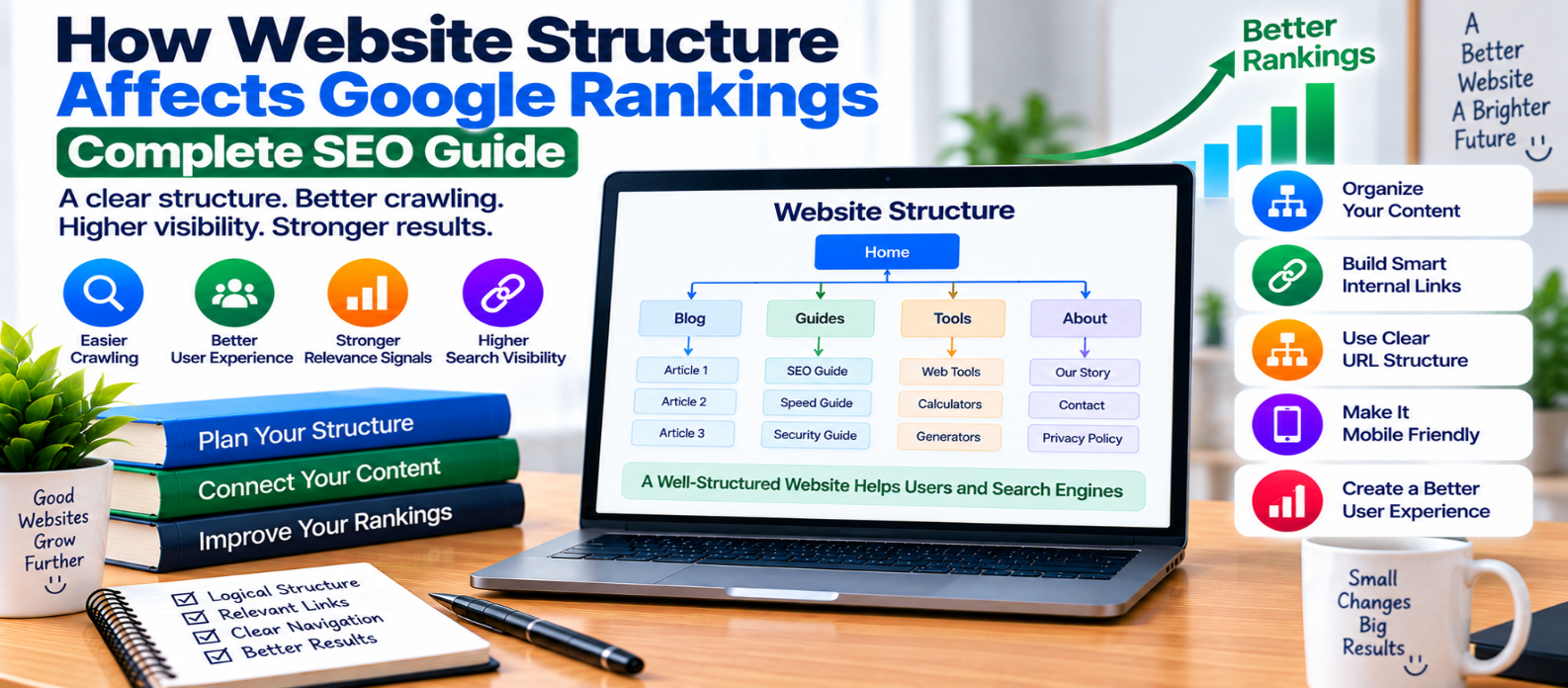
"Learn how website structure can affect Google search visibility through crawling, indexing, internal linking, page hierarchy, topic relationships, URLs, breadcrumbs, mobile navigation, and user experience."
How Website Structure Affects Google Rankings
Website structure is the way pages are organized and connected across a site.
A clear structure helps visitors find information, while also giving search engines understandable paths for discovering and processing pages. Poor structure can leave useful content buried, isolated, duplicated, or difficult to navigate.
Website architecture alone doesn't guarantee higher Google rankings. But it can influence several technical and usability factors that affect how effectively your content can compete in search.
What Is Website Structure?
Website structure describes the hierarchy and relationships between pages.
A simple structure might look like:
Homepage
   ↓
Main Category
   ↓
Subcategory
   ↓
Individual Page
For a web-development website:
Home
 ├── Web Development
 │    ├── HTML
 │    ├── CSS
 │    └── JavaScript
 ├── SEO
 │    ├── Technical SEO
 │    └── On-Page SEO
 └── Website Security
      ├── HTTPS
      └── Authentication
Visitors can understand where information belongs, and related pages naturally form groups.
1. Structure Helps Search Engines Discover Pages
Search crawlers often discover URLs by following links.
If important pages are connected through normal internal links, crawlers have clear paths to them.
Compare:
Homepage → Category → Guidewith an important guide that has no meaningful internal links pointing to it.
The second page may still be discovered through other methods, such as an XML sitemap, but integrating it into the site's architecture creates a stronger natural discovery path.
2. Good Architecture Reduces Orphan Pages
An orphan page is a page with no meaningful internal links leading to it.
Imagine publishing an excellent guide at:
/guides/website-security/but never linking to it from your navigation, related articles, category pages, or other relevant content.
Users may struggle to discover it naturally.
Important pages should normally belong somewhere within your site's structure.
3. Internal Links Communicate Relationships
Website architecture and internal linking work together.
Suppose you have these articles:
Technical SEO
 ├── XML Sitemaps
 ├── Robots.txt
 ├── Canonical URLs
 └── Schema Markup
Linking these pages appropriately helps establish their relationship to the broader technical SEO topic.
This doesn't mean every article in a category should link to every other article.
Links should exist when they genuinely help users move to relevant information.
4. Important Pages Shouldn't Be Buried
A useful page that requires many unnecessary navigation steps to reach may be harder for visitors to discover.
For example:
Home
 ↓
Category
 ↓
Archive
 ↓
Year
 ↓
Month
 ↓
Page 7
 ↓
Important Guide
may be less practical than giving important evergreen content a clearer path from relevant category or hub pages.
There is no universal rule that every page must be exactly a certain number of clicks from the homepage.
Focus instead on making important content reasonably easy to reach.
5. Topic Hubs Can Organize Related Content
A topic hub introduces a broad subject and connects visitors to detailed resources.
For example:
Website Performance
       ↓
 ┌─────┼────────┬────────┐
 ↓     ↓        ↓        ↓
LCP   INP      CLS     Images
Each supporting guide addresses a specific need.
The hub gives users a logical starting point while helping organize the subject clearly.
Avoid creating near-duplicate articles simply to make a topic cluster appear larger. Each supporting page should have a distinct purpose.
6. URL Structure Should Be Understandable
URLs are one part of site organization.
A clean URL might be:
example.com/seo/canonical-urls/instead of:
example.com/page?id=4827&cat=16&type=xSimple, descriptive URLs can be easier for people to understand and manage.
However, don't repeatedly change existing URLs merely to make them look prettier. URL changes can introduce redirects, broken links, and migration work.
7. Breadcrumbs Can Clarify Hierarchy
Breadcrumb navigation shows where a page sits within a broader structure.
For example:
Home > SEO > Technical SEO > Canonical URLsBreadcrumbs can help visitors move to higher-level sections and understand the page's context.
They are particularly useful for websites with categories, products, documentation, or other hierarchical content.
8. Navigation Should Highlight Useful Sections
Your main navigation doesn't need to contain every page.
Instead, it should provide clear access to important areas.
A crowded menu containing dozens of competing choices can become harder to use.
A cleaner approach is:
Home
Tools
Blog
Guides
About
with deeper navigation available inside relevant sections.
Design navigation primarily for people while ensuring important destinations use accessible, crawlable links.
9. Structure Can Help Control Duplicate URLs
Poorly planned site functionality can create many versions of similar content through:
- Filters
- Sorting
- Tracking parameters
- Tags
- Archives
- Search results
- Product variations
For example:
/products/
/products/?sort=price
/products/?sort=newest
/products/?ref=home
Technical controls such as canonicalization, crawl management, and consistent internal linking can help clarify which URLs matter.
The best solution depends on why each variation exists.
10. Mobile Navigation Matters
A structure that works well on desktop can become frustrating on a phone.
Check whether mobile visitors can:
- Open navigation easily
- Reach major categories
- Use breadcrumbs where provided
- Tap links comfortably
- Return to higher-level pages
- Find important content without excessive interaction
Good architecture should survive the transition from a large screen to a small one.
11. Site Structure Supports User Experience
Search optimization shouldn't separate crawlers from people.
A logical structure can help visitors answer questions such as:
Where am I?
What other information is related?
Where should I go next?
If visitors repeatedly need to use search because normal navigation doesn't expose relevant content, your structure may need improvement.
12. Structure Matters During Website Growth
A structure that works for 20 pages may become confusing at 2,000 pages.
Plan categories around meaningful subjects rather than creating a new category for every small variation.
Periodically review:
Categories
     ↓
Subcategories
     ↓
Internal Links
     ↓
Orphan Pages
     ↓
Duplicate URLs
As the website grows, consolidation may be as important as expansion.
Website Structure Checklist
Review whether your website has:
-
A logical page hierarchy
-
Clear main navigation
-
Important pages connected internally
-
Few unnecessary navigation layers
-
Relevant topic hubs
-
Descriptive URLs
-
Useful breadcrumbs where appropriate
-
No important orphan pages
-
Consistent canonical URLs
-
Controlled duplicate URL variations
-
Crawlable navigation links
-
Mobile-friendly navigation
-
Updated internal links after URL changes
-
XML sitemaps aligned with important pages
-
Regular architecture reviews as content grows
Conclusion
Website structure affects much more than the appearance of your menus.
It connects:
Content Organization
        ↓
Internal Linking
        ↓
Crawler Discovery
        ↓
Page Relationships
        ↓
User Navigation
        ↓
Search Visibility
A clear architecture makes important content easier to discover, reduces isolated pages, creates meaningful relationships between topics, and gives visitors logical routes through the website.
Don't redesign your architecture around a supposed ranking formula.
Build a structure that makes sense for your content and your visitors, then reinforce it with relevant internal links, consistent URLs, useful navigation, breadcrumbs where appropriate, and clean technical signals.
Get a Free Access To 200+ Free Tools:
|
Home Page |
|
|
Calculator Tools |
|
|
Text & Converter Tools |
|
|
PDF & Image Tools |
|
|
Games & Developer Tools |
|
|
Resume Builder |