
SEO-Friendly Website Architecture: Complete Guide
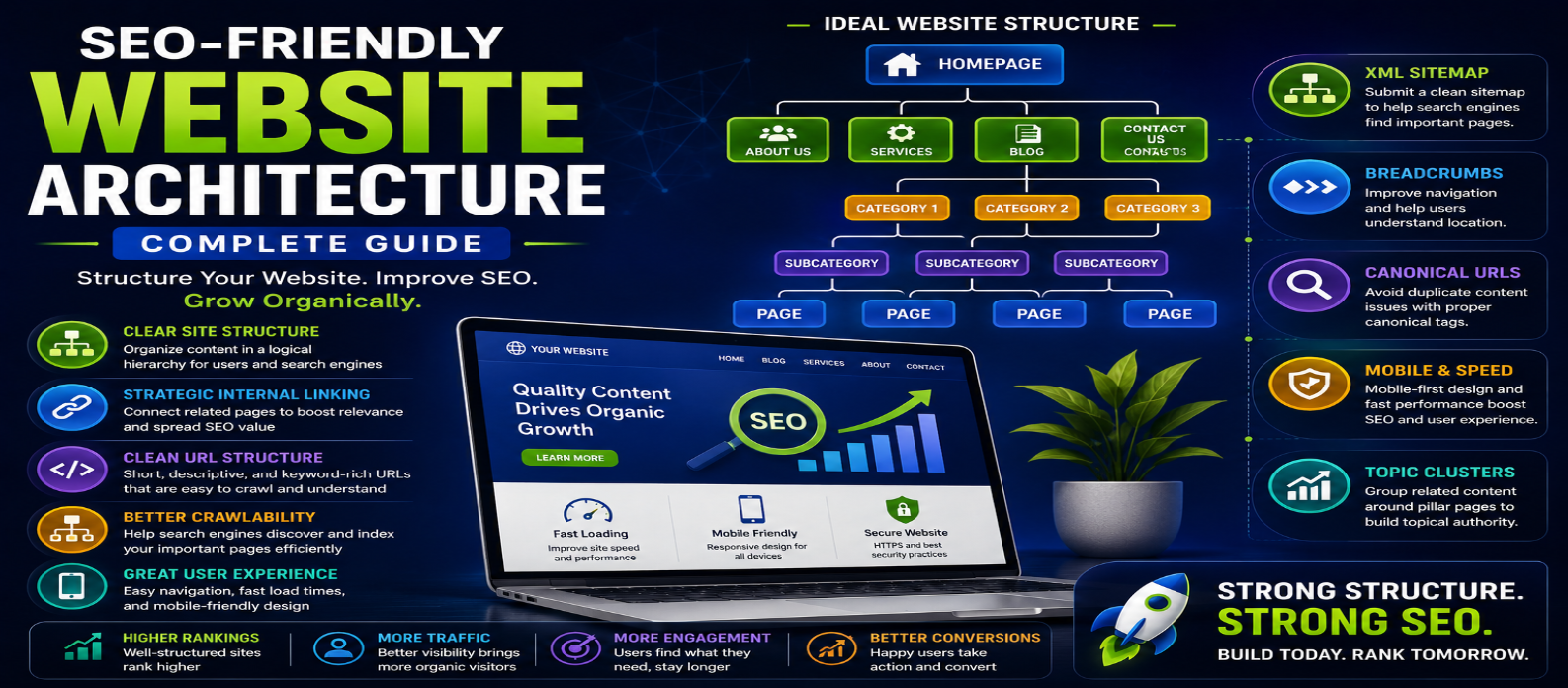
"Learn how to build SEO-friendly website architecture with a clear site hierarchy, clean URLs, strategic internal linking, breadcrumbs, topic clusters, XML sitemaps, mobile navigation, and crawlable site structure."
SEO-Friendly Website Architecture: Complete Guide
A well-structured website is easier for visitors to navigate and easier for search engines to discover, crawl, and understand. That makes SEO-friendly website architecture an important foundation for long-term organic search performance.
Website architecture describes how pages are organized and connected through categories, navigation, URLs, internal links, breadcrumbs, and other structural elements. Poor architecture can leave important pages buried deep within a site, while a logical structure helps both users and search engines reach valuable content efficiently.
This complete guide explains how to create an SEO-friendly website architecture that supports better crawling, usability, indexing, and organic growth.
What Is Website Architecture?
Website architecture is the hierarchical structure used to organize pages and content across a website.
A simple structure might look like:
Homepage → Category → Subcategory → Page
For a blog, it could be:
Homepage → Blog → Web Development → Article
The objective is to create clear relationships between pages instead of building a collection of disconnected URLs.
Why Website Architecture Matters for SEO
Search engines discover many webpages by following links. A clear site structure makes it easier to locate important pages and understand how different topics relate to one another.
Good architecture can help with:
- Crawlability
- Content discovery
- Internal linking
- User navigation
- Topical organization
- URL management
- Indexing
- Website scalability
It can also reduce the chance of creating orphan pages that have no useful internal links pointing to them.
1. Keep Your Website Structure Simple
Avoid unnecessarily complicated hierarchies.
For many websites, a structure such as:
Home → Main Category → Subcategory → Content
is easier to manage than creating many layers of folders and pages.
Important pages should generally be reachable without forcing visitors to navigate through numerous intermediate pages.
A simple structure also makes future expansion easier.
2. Create Logical Categories
Group related content into meaningful categories.
For example, a technology website might use:
Web Development | SEO | AI | Online Tools | Cybersecurity
Under Web Development, you could have articles about:
HTML | CSS | JavaScript | Website Performance
Categories should help users understand what your website covers rather than existing only for SEO purposes.
Avoid creating dozens of nearly identical categories with very little content.
3. Use Clean and Descriptive URLs
URLs should clearly communicate what a page is about.
Good:
example.com/blog/seo-friendly-website-architecture
Less useful:
example.com/page?id=74839&category=11
A strong URL is generally:
Readable + Descriptive + Concise + Consistent
Avoid unnecessarily changing URLs after pages begin receiving traffic. If a permanent URL change is required, implement the appropriate redirect.
4. Build Strong Navigation
Your primary navigation should direct users toward the most important areas of your website.
Keep menus clear and avoid overwhelming visitors with too many choices.
A typical navigation structure might be:
Home | Tools | Blog | Categories | About | Contact
Navigation should also work properly on mobile devices and remain accessible through keyboards and other assistive technologies.
5. Use Internal Links Strategically
Internal linking is one of the most important parts of website architecture.
Connect related content naturally.
For example:
Technical SEO → Website Architecture → Internal Linking → XML Sitemap → Core Web Vitals
Internal links help users discover additional content and create pathways search engines can follow.
Use descriptive anchor text that explains the destination instead of repeatedly using generic phrases such as "click here."
6. Avoid Orphan Pages
An orphan page is a webpage with no meaningful internal links pointing to it.
Even if the page exists in an XML sitemap, it should ideally be connected to the rest of the website when it is important to users.
Regularly audit your site to find valuable pages that are difficult to reach through navigation or contextual links.
7. Use Breadcrumb Navigation
Breadcrumbs show visitors where they are within the site's hierarchy.
For example:
Home > Blog > SEO > Website Architecture
Breadcrumbs can improve navigation, particularly on websites containing many categories and pages.
Keep the breadcrumb hierarchy consistent with the actual structure of the website.
8. Create Topic Clusters
Topic clusters organize related articles around a central subject.
For example, a main Technical SEO Guide could connect to supporting articles about:
- Website architecture
- XML sitemaps
- Robots.txt
- Canonical URLs
- Core Web Vitals
- Structured data
- Internal linking
These supporting pages should link logically to the main guide and to other relevant articles.
This creates a connected content ecosystem instead of isolated posts.
9. Prioritize Important Pages
Not every page on a website has equal importance.
High-value pages should receive stronger visibility through:
- Navigation
- Category pages
- Internal links
- Related-content sections
- Breadcrumbs
Avoid placing your most important pages deep inside the website while giving low-value pages prominent positions.
10. Create an Accurate XML Sitemap
An XML sitemap can help search engines discover important URLs.
Your sitemap should generally focus on canonical, indexable pages you actually want search engines to find.
Avoid filling it with:
- Broken URLs
- Redirected pages
- Duplicate URLs
- Non-indexable pages
- Unnecessary parameter URLs
Update your sitemap as the website changes.
11. Control Duplicate Content
Poor architecture can create multiple URLs displaying identical or very similar content.
Common causes include:
- Filters
- Tracking parameters
- Sorting options
- Pagination
- HTTP and HTTPS versions
- Duplicate category paths
Use consistent internal links, redirects, canonical URLs, and sensible URL handling to reduce duplication.
12. Make Architecture Mobile-Friendly
Your site's structure should remain easy to use on smaller screens.
Mobile visitors should be able to:
- Access navigation
- Find categories
- Follow internal links
- Use breadcrumbs
- Read content
- Reach important pages
Don't hide important content or navigation simply because the visitor is using a smartphone.
13. Improve Website Speed
Architecture and performance can affect each other.
Large navigation systems, excessive scripts, complicated templates, and unnecessary page elements can increase loading time.
Keep templates efficient and optimize:
Images → CSS → JavaScript → Fonts → Server Response → Caching
Fast navigation helps both usability and overall website quality.
14. Plan Architecture Before Expanding
Website architecture becomes harder to change as a site grows.
Before publishing hundreds of pages, establish:
- Main categories
- URL conventions
- Navigation
- Internal-linking rules
- Content hierarchy
- Sitemap structure
Planning early can prevent major restructuring later.
SEO-Friendly Website Architecture Example
A technology website could use:
Homepage
→ Web Development
→ HTML
→ CSS
→ JavaScript
→ SEO
→ Technical SEO
→ Keyword Research
→ Website Performance
→ AI
→ AI Tools
→ AI Development
→ AI Guides
Each section can then contain supporting articles connected through contextual internal links.
This creates clear topical relationships for both visitors and search engines.
Website Architecture SEO Checklist
Before launching or restructuring your website, check:
Simple Hierarchy → Logical Categories → Clean URLs → Clear Navigation → Strong Internal Links → No Orphan Pages → Breadcrumbs → Topic Clusters → Accurate Sitemap → Canonical URLs → Mobile-Friendly Structure → Fast Performance
Review this structure regularly as your website grows.
Conclusion
SEO-friendly website architecture creates the foundation on which your content, technical SEO, and internal-linking strategies operate.
The goal is simple: make every important page easy to find, understand, and navigate.
Use logical categories, clean URLs, descriptive internal links, breadcrumbs, topic clusters, accurate sitemaps, and a shallow hierarchy wherever practical.
When visitors can move naturally through your website and search engines can efficiently discover its important pages, you create a stronger foundation for organic visibility, user engagement, and sustainable website growth.
Get a Free Access To 200+ Free Tools:
|
Home Page |
|
|
Calculator Tools |
|
|
Text & Converter Tools |
|
|
PDF & Image Tools |
|
|
Games & Developer Tools |
|
|
Resume Builder |