
UX vs UI: Complete Guide to User Experience and User Interface Design
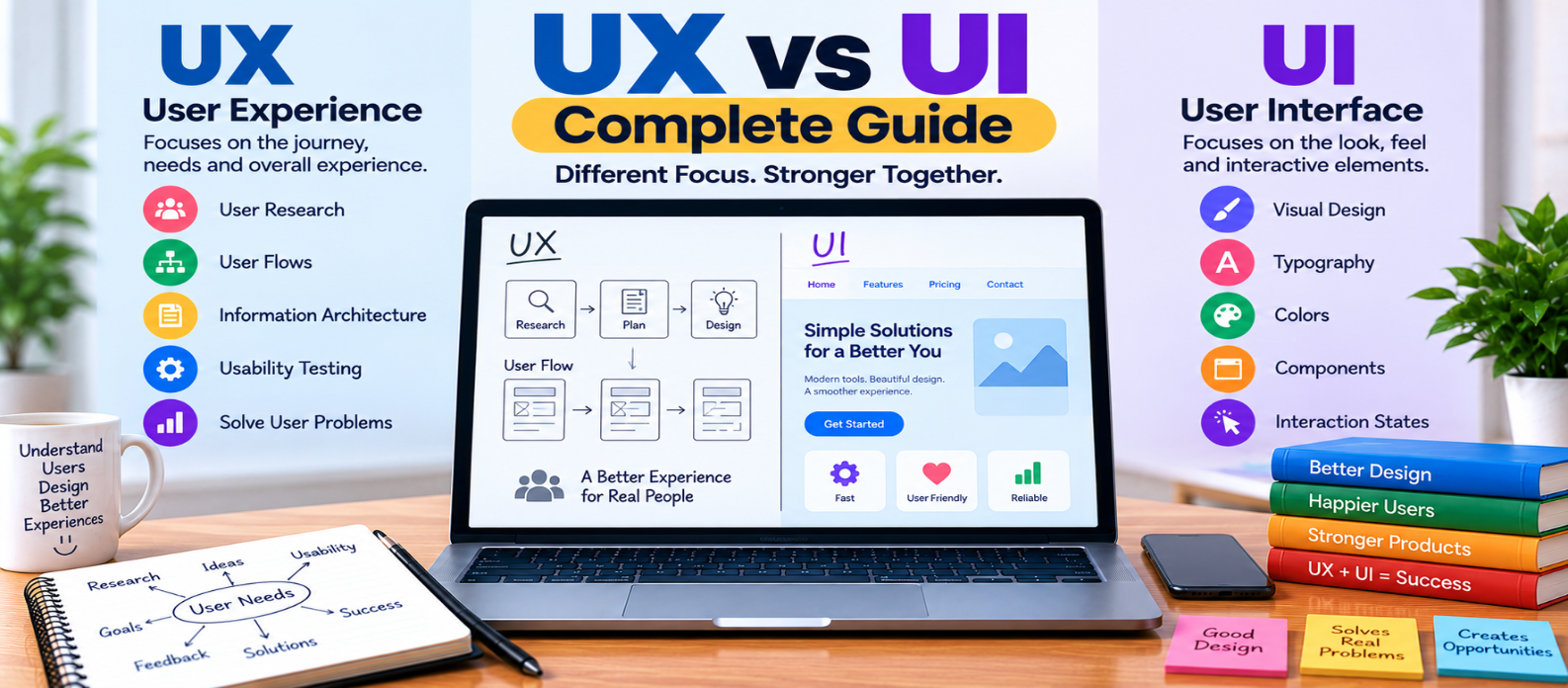
"Understand the difference between UX and UI design, what UX and UI designers do, the skills each field requires, practical examples, accessibility considerations, and how both disciplines work together to create better digital products."
UX vs UI: Complete Guide
UX and UI are often mentioned together, which makes them easy to confuse.
Both influence how people interact with websites, apps, and digital products, but they focus on different parts of that experience.
In simple terms:
UX focuses on how the experience works. UI focuses on how the interface looks and communicates interaction.
A successful product needs both.
What Is UX?
UX stands for User Experience.
UX design focuses on the overall experience someone has while trying to accomplish something with a product.
A UX designer might ask:
- What does the user need?
- Can they find what they're looking for?
- Are important tasks easy to complete?
- Where do users become confused?
- Does the navigation make sense?
- Are unnecessary steps creating friction?
Consider an online store.
A shopper might follow this journey:
Find Product
    ↓
View Details
    ↓
Add to Cart
    ↓
Enter Delivery Information
    ↓
Pay
    ↓
Receive Confirmation
UX examines that entire journey.
If checkout requires unnecessary steps or users can't understand delivery options, the experience has problems even if the website looks beautiful.
What Is UI?
UI stands for User Interface.
UI design focuses on the visual and interactive elements people encounter while using a product.
That includes:
- Buttons
- Colors
- Typography
- Icons
- Forms
- Cards
- Menus
- Spacing
- Layouts
- Visual states
For example, a UI designer working on a checkout button might decide:
Button size
Button label
Typography
Spacing
Visual hierarchy
Hover state
Focus state
Disabled state
The goal is not simply decoration.
Good UI helps communicate what elements are, what users can do, and what is happening.
UX vs UI: What's the Difference?
The distinction becomes clearer when you compare their primary focus.
| UX | UI |
|---|---|
| Overall user experience | Visual and interactive interface |
| User journeys | Colors and typography |
| Information architecture | Buttons and controls |
| Task flows | Spacing and layouts |
| Usability | Visual hierarchy |
| Research | Component appearance |
| Prototyping | Interaction states |
| Identifying friction | Visual consistency |
A useful shortcut is:
UX → Is this easy and logical to use?

UI → Is the interface clear and well presented?
Neither exists completely independently of the other.
A Practical UX vs UI Example
Imagine you're designing a hotel-booking app.
UX decisions could include:
- Where search appears
- Which filters users need
- How many steps booking requires
- How rooms are compared
- When pricing information appears
- How cancellations are explained
- What happens after payment
UI decisions could include:
- Search-box appearance
- Button styling
- Filter controls
- Card layouts
- Font choices
- Icons
- Spacing
- Selected and disabled states
UX defines much of the journey and behavior.
UI helps make that journey visible, understandable, and interactive.
Can You Have Good UI but Bad UX?
Absolutely.
Imagine a beautifully designed signup page with polished animations and elegant typography.
But creating an account requires:
Create Account
     ↓
Verify Email
     ↓
Complete 15 Fields
     ↓
Verify Phone
     ↓
Choose Preferences
     ↓
Confirm Again
It may look excellent while still feeling unnecessarily difficult.
That's attractive UI combined with frustrating UX.
Can You Have Good UX but Weak UI?
Yes.
Imagine a tool that completes a task quickly and logically but has:
- Poor contrast
- Inconsistent buttons
- Confusing visual hierarchy
- Tiny text
- Crowded spacing
- Unclear icons
The workflow may be efficient, but the interface makes it harder to understand.
Good UX cannot always compensate for poor interface communication.
What Does a UX Designer Do?
Responsibilities vary between organizations, but UX work can involve:
- User research
- User interviews
- Journey mapping
- Information architecture
- User flows
- Wireframes
- Prototypes
- Usability testing
- Accessibility considerations
- Analyzing user problems
The central question is usually:
How can we make this product work better for the people using it?
What Does a UI Designer Do?
UI responsibilities may include:
- Visual design
- Typography
- Color systems
- Component design
- Layout
- Iconography
- Responsive interface states
- Interaction states
- Design systems
- Visual consistency
A UI designer may define how one button behaves visually across:
Default
Hover
Focus
Pressed
Disabled
Loading
This creates consistency across the product.
Where Does Accessibility Fit?
Accessibility belongs to both UX and UI.
UX should consider whether different people can complete important tasks.
UI should consider areas such as:
- Color contrast
- Text readability
- Focus visibility
- Touch-target usability
- Error communication
- Interface clarity
Accessibility shouldn't be something either discipline assumes belongs entirely to the other.
UX and UI Work Better Together
Consider a form.
UX determines questions such as:
Do we need this field?
When should we ask for it?
What happens if there's an error?
Can the process be shorter?
UI determines:
How is the label displayed?
Is the input visually clear?
What does the error look like?
Is keyboard focus visible?
When these decisions support each other, the result is easier to use.
UX vs UI Skills
Someone learning UX may focus on:
- Research
- Problem solving
- User flows
- Wireframing
- Prototyping
- Usability testing
- Information architecture
Someone learning UI may focus more heavily on:
- Typography
- Color
- Layout
- Spacing
- Components
- Visual hierarchy
- Responsive interfaces
- Design systems
Both benefit from understanding human behavior, accessibility, communication, and the basics of how digital products are built.
Do You Need to Choose Between UX and UI?
Not necessarily.
Some roles specialize strongly in one area. Others combine both under titles such as UX/UI Designer or Product Designer.
If you're learning, experimenting with both can help you discover what interests you.
For example:
Research a Problem
      ↓
Design the User Flow
      ↓
Create a Wireframe
      ↓
Design the Interface
      ↓
Build a Prototype
      ↓
Test With Users
      ↓
Improve
That process exposes you to both UX and UI thinking.
UX vs UI Checklist
When reviewing a digital product, ask:
UX
-
Can users accomplish their main goal?
-
Is navigation understandable?
-
Are unnecessary steps removed?
-
Are errors easy to recover from?
-
Does the workflow match user needs?
-
Has the experience been tested?
UI
-
Is the visual hierarchy clear?
-
Is text readable?
-
Are controls recognizable?
-
Are components consistent?
-
Are interaction states clear?
-
Does the interface work across screen sizes?
Conclusion
UX and UI are different disciplines, but separating them completely misses how digital products are actually experienced.
Think of them as connected layers:
User Need
    ↓
UX Research
    ↓
User Journey
    ↓
Interaction Design
    ↓
UI Design
    ↓
Usable Product
    ↓
Testing and Improvement
UX helps determine what experience makes sense. UI helps communicate and deliver that experience through the interface.
A polished interface cannot rescue a fundamentally confusing journey, and a logical journey becomes harder to use when the interface communicates poorly.
The strongest digital products make both work together.
Get a Free Access To 200+ Free Tools:
|
Home Page |
|
|
Calculator Tools |
|
|
Text & Converter Tools |
|
|
PDF & Image Tools |
|
|
Games & Developer Tools |
|
|
Resume Builder |